USP
Unlike plain Git worktrees, Worktrunk offers streamlined commands, workflow automation via hooks, and features like LLM commit messages and interactive pickers, significantly enhancing productivity for multi-agent development.
Use cases
- 01Managing multiple parallel AI agent development branches
- 02Automating Git workflows with custom hooks
- 03Simplifying complex Git worktree operations
- 04Generating LLM-powered commit messages
- 05Quickly switching between development environments
Detected files (5)
skills/worktrunk/SKILL.mdskillShow content (12295 bytes)
--- name: worktrunk description: Guidance for Worktrunk (the `wt` CLI) — git worktree management, hooks, and config. Load when editing .config/wt.toml or ~/.config/worktrunk/config.toml; adding, modifying, or debugging hooks (post-merge, post-start, pre-commit, pre-merge, post-switch, etc.); configuring commit message generation or command aliases; or troubleshooting wt behavior. Also answers general worktrunk/wt questions. version: 0.48.0 license: MIT OR Apache-2.0 compatibility: Requires worktrunk CLI (https://worktrunk.dev) --- # Worktrunk Help users work with Worktrunk, a CLI tool for managing git worktrees. ## Available Documentation Reference files are synced from [worktrunk.dev](https://worktrunk.dev) documentation: - **reference/config.md**: User and project configuration (LLM, hooks, command defaults) - **reference/hook.md**: Hook types, timing, and execution order - **reference/switch.md**, **merge.md**, **list.md**, etc.: Command documentation - **reference/llm-commits.md**: LLM commit message generation - **reference/tips-patterns.md**: Language-specific tips and patterns - **reference/shell-integration.md**: Shell integration debugging - **reference/troubleshooting.md**: Troubleshooting for LLM and hooks (Claude-specific) For command-specific options, run `wt <command> --help`. For configuration, follow the workflows below. ## Two Types of Configuration Worktrunk uses two separate config files with different scopes and behaviors: ### User Config (`~/.config/worktrunk/config.toml`) - **Scope**: Personal preferences for the individual developer - **Location**: `~/.config/worktrunk/config.toml` (never checked into git) - **Contains**: LLM integration, worktree path templates, command settings, user hooks, approved commands - **Permission model**: Always propose changes and get consent before editing - **See**: `reference/config.md` for detailed guidance ### Project Config (`.config/wt.toml`) - **Scope**: Team-wide automation shared by all developers - **Location**: `<repo>/.config/wt.toml` (checked into git) - **Contains**: Hooks for worktree lifecycle (pre-start, pre-merge, etc.) - **Permission model**: Proactive (create directly, changes are reversible via git) - **See**: `reference/hook.md` for detailed guidance ## Determining Which Config to Use When a user asks for configuration help, determine which type based on: **User config indicators**: - "set up LLM" or "configure commit generation" - "change where worktrees are created" - "customize commit message templates" - Affects only their environment **Project config indicators**: - "set up hooks for this project" - "automate npm install" - "run tests before merge" - Affects the entire team **Both configs may be needed**: For example, setting up commit message generation requires user config, but automating quality checks requires project config. ## Core Workflows ### Setting Up Commit Message Generation (User Config) Most common request. See `reference/llm-commits.md` for supported tools and exact command syntax. 1. **Detect available tools** ```bash which claude codex llm aichat 2>/dev/null ``` 2. **If none installed, recommend Claude Code** (already available in Claude Code sessions) 3. **Propose config change** — Get the exact command from `reference/llm-commits.md` ```toml [commit.generation] command = "..." # see reference/llm-commits.md for tool-specific commands ``` Ask: "Should I add this to your config?" 4. **After approval, apply** - Check if config exists: `wt config show` - If not, guide through `wt config create` - Read, modify, write preserving structure 5. **Suggest testing** ```bash wt step commit --show-prompt | head # verify prompt builds wt merge # in a repo with uncommitted changes ``` ### Setting Up Project Hooks (Project Config) Common request for workflow automation. Follow discovery process: 1. **Detect project type** ```bash ls package.json Cargo.toml pyproject.toml ``` 2. **Identify available commands** - For npm: Read `package.json` scripts - For Rust: Common cargo commands - For Python: Check pyproject.toml 3. **Design appropriate hooks** (7 hook types available) - Dependencies (fast, must complete) → `pre-start` - Tests/linting (must pass) → `pre-commit` or `pre-merge` - Long builds, dev servers → `post-start` - Terminal/IDE updates → `post-switch` - Deployment → `post-merge` - Cleanup tasks → `pre-remove` 4. **Validate commands work** ```bash npm run lint # verify exists which cargo # verify tool exists ``` 5. **Create `.config/wt.toml`** ```toml # Install dependencies when creating worktrees pre-start = "npm install" # Validate code quality before committing [pre-commit] lint = "npm run lint" typecheck = "npm run typecheck" # Run tests before merging pre-merge = "npm test" ``` 6. **Add comments explaining choices** 7. **Suggest testing** ```bash wt switch --create test-hooks ``` **See `reference/hook.md` for complete details.** ### Adding Hooks to Existing Config When users want to add automation to an existing project: 1. **Read existing config**: `cat .config/wt.toml` 2. **Determine hook type** - When should this run? - Creating worktree (blocking) → `pre-start` - Creating worktree (background) → `post-start` - Every switch → `post-switch` - Before committing → `pre-commit` - Before merging → `pre-merge` - After merging → `post-merge` - Before removal → `pre-remove` 3. **Handle format conversion if needed** Single command to named table: ```toml # Before pre-start = "npm install" # After (adding db:migrate) [pre-start] install = "npm install" migrate = "npm run db:migrate" ``` 4. **Preserve existing structure and comments** ### Validation Before Adding Commands Before adding hooks, validate: ```bash # Verify command exists which npm which cargo # For npm, verify script exists npm run lint --dry-run # For shell commands, check syntax bash -n -c "if [ true ]; then echo ok; fi" ``` **Dangerous patterns** — Warn users before creating hooks with: - Destructive commands: `rm -rf`, `DROP TABLE` - External dependencies: `curl http://...` - Privilege escalation: `sudo` ## Permission Models ### User Config: Conservative - **Never edit without consent** - Always show proposed change and wait for approval - **Never install tools** - Provide commands for users to run themselves - **Preserve structure** - Keep existing comments and organization - **Validate first** - Ensure TOML is valid before writing ### Project Config: Proactive - **Create directly** - Changes are versioned, easily reversible - **Validate commands** - Check commands exist before adding - **Explain choices** - Add comments documenting why hooks exist - **Warn on danger** - Flag destructive operations before adding ## Common Tasks Reference ### User Config Tasks - Set up commit message generation → `reference/llm-commits.md` - Customize worktree paths → `reference/config.md#worktree-path-template` - Custom commit templates → `reference/llm-commits.md#templates` - Configure command defaults → `reference/config.md#command-settings` - Set up personal hooks → `reference/config.md#user-hooks` ### Project Config Tasks - Set up hooks for new project → `reference/hook.md` - Add hook to existing config → `reference/hook.md#configuration` - Use template variables → `reference/hook.md#template-variables` - Add dev server URL to list → `reference/config.md#dev-server-url` ## Key Commands ```bash # View all configuration wt config show # Create initial user config wt config create # LLM setup guide wt config --help ``` ## Loading Additional Documentation Load **reference files** for detailed configuration, hook specifications, and troubleshooting. Find specific sections with grep: ```bash grep -A 20 "## Setup" reference/llm-commits.md grep -A 30 "### pre-start" reference/hook.md grep -A 20 "## Warning Messages" reference/shell-integration.md ``` ## Hook Approvals in Non-Interactive Sessions Project hooks and project aliases prompt for approval on first run, so an untrusted `.config/wt.toml` can't silently execute arbitrary commands. Agents running `wt merge`, `wt switch`, or other commands that trigger hooks will hit an error like: ``` ▲ cargo-difftest needs approval to execute 1 command: ○ post-merge install: cargo install --path . ✗ Cannot prompt for approval in non-interactive environment ↳ To skip prompts in CI/CD, add --yes; to pre-approve commands, run wt config approvals add ``` Two resolutions exist — pick based on who the agent is running for: - **`wt config approvals add`** — interactive prompt that stores approvals to `~/.config/worktrunk/approvals.toml`. Run once per project; persists across invocations until the command template changes or the project moves. This is the right choice when the human owns the trust decision. - **`--yes`** / `-y` — bypasses approval for a single invocation. Appropriate for CI/CD where hook contents are controlled by the pipeline itself. **When invoked as an agent, stop and escalate to the user** — pre-approval is a security decision about whether this project's hooks should be trusted to run arbitrary commands on their machine. Tell the user to run `wt config approvals add` (or review and re-run with `--yes` if they accept the CI-style one-shot bypass). Don't reach for `--yes` on the user's behalf just to unblock the command. ## Advanced: Agent Handoffs When the user requests spawning a worktree with an agent in a background session ("spawn a worktree for...", "hand off to another agent"), use the appropriate pattern for their terminal multiplexer. Substitute `<agent-cli>` with the CLI you are running as: `claude` for Claude Code, `'opencode run'` for OpenCode. **tmux** (check `$TMUX` env var): ```bash tmux new-session -d -s <branch-name> "wt switch --create <branch-name> -x <agent-cli> -- '<task description>'" ``` **Zellij** (check `$ZELLIJ` env var): ```bash zellij run -- wt switch --create <branch-name> -x <agent-cli> -- '<task description>' ``` **Requirements** (all must be true): - User explicitly requests spawning/handoff - User is in a supported multiplexer (tmux or Zellij) - The user's project instructions (`CLAUDE.md` or `AGENTS.md`) or an explicit prompt authorize this pattern **Do not use this pattern** for normal worktree operations. Example (tmux, Claude Code): ```bash tmux new-session -d -s fix-auth-bug "wt switch --create fix-auth-bug -x claude -- \ 'The login session expires after 5 minutes. Find the session timeout config and extend it to 24 hours.'" ``` Example (Zellij, OpenCode): ```bash zellij run -- wt switch --create fix-auth-bug -x 'opencode run' -- \ 'The login session expires after 5 minutes. Find the session timeout config and extend it to 24 hours.' ``` ### Parallel sub-Agents (single Claude Code session) To spawn multiple sub-Agents that each work in their own worktree from one Claude Code session — no terminal multiplexer, no human in the other pane — pre-create each worktree from the parent and pass the path into the sub-Agent prompt: ```bash wt switch --create <branch> --no-cd --no-hooks ``` Then call the `Agent` tool **without** `isolation: "worktree"`, naming the path in the prompt: ``` You are working in `/abs/path/to/worktrunk.<branch>` on branch `<branch>`. All edits must stay in that worktree. ``` `--no-cd` skips the shell-integration cd script the parent can't consume; `--no-hooks` is appropriate when each sub-Agent will run its own build/test step (e.g. `cargo run -- hook pre-merge --yes`) and you don't need post-start setup repeated per worktree. **Do not** use `Agent { isolation: "worktree" }` for this. Claude Code passes its internal agent ID as `name` to the `WorktreeCreate` hook, so `wt` creates the worktree as `worktrunk.agent-<id>` on a throwaway branch. If the sub-Agent then creates a feature branch on top, you end up with non-canonical paths, orphan branches, and post-start hooks fired against the wrong branch. Pre-creating with `wt switch --create` keeps path, branch, and hook target aligned..claude/skills/writing-user-outputs/SKILL.mdskillShow content (37838 bytes)
--- name: writing-user-outputs description: CLI output formatting standards for worktrunk. Load before editing any code that calls warning_message, hint_message, error_message, info_message, eprintln, or println, or that produces strings the user will see (CLI help, progress UI, snapshot text). Documents ANSI color nesting rules, message patterns, and output system architecture. metadata: internal: true --- # Output System Architecture ## Shell Integration Worktrunk uses split file-based directive passing for shell integration: 1. Shell wrapper creates two temp files via `mktemp` (cd and exec) 2. Shell wrapper sets `WORKTRUNK_DIRECTIVE_CD_FILE` and `WORKTRUNK_DIRECTIVE_EXEC_FILE` 3. wt writes a raw path to the CD file; shell commands to the EXEC file (for `--execute`) 4. Shell wrapper reads the CD file with `cd -- "$(< file)"` (no shell parsing) 5. Shell wrapper sources the EXEC file if non-empty When neither directive env var is set (direct binary call), commands execute directly and shell integration hints are shown. ## Output Functions The output system handles shell integration automatically. Just call output functions — they do the right thing regardless of whether shell integration is active. ```rust // NEVER DO THIS - don't check mode in command code if is_shell_integration_active() { // different behavior } // ALWAYS DO THIS - just call output functions eprintln!("{}", success_message("Created worktree")); output::change_directory(&path)?; // Writes to directive file if set, else no-op ``` **Printing output:** Use `eprintln!` and `println!` from `worktrunk::styling` (re-exported from `anstream` for automatic color support and TTY detection): ```rust use worktrunk::styling::{eprintln, println, stderr}; // Status messages to stderr eprintln!("{}", success_message("Created worktree")); // Primary output to stdout (tables, JSON, pipeable) println!("{}", table_output); // Flush before interactive prompts stderr().flush()?; ``` **Shell integration functions** (`src/output/global.rs`): | Function | Purpose | |----------|---------| | `change_directory(path)` | Shell cd after wt exits (writes to directive file if set) | | `execute(command)` | Shell command after wt exits | | `terminate_output()` | Reset ANSI state on stderr | | `is_shell_integration_active()` | Check if directive file set (rarely needed) | | `pre_hook_display_path(path)` | Compute display path for pre-hooks | | `post_hook_display_path(path)` | Compute display path for post-hooks | **Message formatting functions** (`worktrunk::styling`): | Function | Symbol | Color | |----------|--------|-------| | `success_message()` | ✓ | green | | `progress_message()` | ◎ | cyan | | `info_message()` | ○ | symbol dim, text plain | | `warning_message()` | ▲ | yellow | | `hint_message()` | ↳ | dim | | `error_message()` | ✗ | red | | `prompt_message()` | ❯ | cyan | **Section headings** (`worktrunk::styling`): ```rust use worktrunk::styling::format_heading; // Plain heading format_heading("BINARIES", None) // => "BINARIES" (cyan) // Heading with suffix format_heading("USER CONFIG", Some("@ ~/.config/wt.toml")) // => "USER CONFIG @ ~/.config/wt.toml" (title cyan, suffix plain) ``` ## stdout vs stderr **Decision principle:** If this command is piped, what should the receiving program get? - **stdout** → Data for pipes, scripts, `eval` (tables, JSON, shell code) - **stderr** → Status for the human watching (progress, success, errors, hints) - **directive file** → Shell commands executed after wt exits (cd, exec) Examples: - `wt list` → table/JSON to stdout (for grep, jq, scripts) - `wt config shell init` → shell code to stdout (for `eval`) - `wt switch` → status messages only (nothing to pipe) ## When to page output Route long, human-oriented stdout through `crate::help_pager::show_help_in_pager`. The helper TTY-detects internally, so piping (`wt … | grep`) keeps working. Page when output is human-oriented (headings, gutters, structure) and plausibly exceeds one screen. Don't page pipe-first data (tables, JSON, shell code), short output, or output already paged by a delegated tool (`git diff`). Examples that page: `--help`, `wt config show`, `wt hook show`, `wt step {commit,squash} --dry-run`. Examples that don't: `wt list`, `wt step diff`, `wt step eval`, `--show-prompt` (pipe-first by design). Build the whole output into a `String` first (don't stream), then: ```rust if let Err(e) = crate::help_pager::show_help_in_pager(&out, true) { log::debug!("Pager failed, falling back to stdout: {}", e); println!("{}", out); } ``` ## Security The split-trust design enforces two trust levels: - `WORKTRUNK_DIRECTIVE_CD_FILE` holds a raw path (no shell parsing), so it's safe to pass through to alias/hook child processes — a body that writes to it can at worst redirect `cd`. - `WORKTRUNK_DIRECTIVE_EXEC_FILE` holds arbitrary shell that the wrapper sources verbatim, so wt scrubs this env var from alias/hook child processes. A hook body writing to it would inject shell into the parent session. All directive env vars are removed from spawned subprocesses by default via `shell_exec::scrub_directive_env_vars()`. `DirectivePassthrough::inherit_from_env()` re-adds only the CD file (and legacy compat file) for trusted contexts. ## Windows Compatibility (Git Bash / MSYS2) On Windows with Git Bash, `mktemp` returns POSIX-style paths like `/tmp/tmp.xxx`. The native Windows binary (`wt.exe`) needs a Windows path to write to the directive file. **No explicit path conversion is needed.** MSYS2 automatically converts POSIX paths in environment variables when spawning native Windows binaries — shell wrappers can use `$directive_file` directly. See: https://www.msys2.org/docs/filesystem-paths/ --- # CLI Output Formatting Standards ## User Message Principles Output messages should acknowledge user-supplied arguments (flags, options, values) by reflecting those choices in the message text. ```rust // User runs: wt switch --create feature --base=main // GOOD - acknowledges the base branch "Created new worktree for feature from main @ /path/to/worktree" // BAD - ignores the base argument "Created new worktree for feature @ /path/to/worktree" ``` **Avoid "you/your" pronouns:** Messages should refer to things directly, not address the user. Imperatives like "Run", "Use", "Add" are fine — they're concise CLI idiom. ```rust // BAD - "Use 'wt merge' to rebase your changes onto main" // GOOD - "Use 'wt merge' to rebase onto main" ``` **Avoid redundant parenthesized content:** Parenthesized text should add new information, not restate what's already said. ```rust // BAD - parentheses restate "no changes" "No changes after squashing 3 commits (commits resulted in no net changes)" // GOOD - clear and concise "No changes after squashing 3 commits" // GOOD - parentheses add supplementary info "Committing with default message... (3 files, +45, -12)" ``` **Two types of parenthesized content with different styling:** 1. **Stats parentheses → Gray** (`[90m` bright-black): Supplementary numerical info that could be omitted without losing meaning. ``` ✓ Merged to main (1 commit, 1 file, +1) ◎ Squashing 2 commits into a single commit (2 files, +2)... ``` 2. **Reason parentheses → Message color**: Explains WHY an action is happening; integral to understanding. ``` ◎ Removing feature worktree & branch in background (same commit as main, _) ``` Stats are truly optional context. Reasons answer "why is this safe/happening?" and belong with the main message. Symbols within reason parentheses still render in their native styling (see "Symbol styling" below). **Show path when hooks run in a different directory:** When hooks run in a worktree other than the user's current (or eventual) location, show the path. Use the appropriate helper function: 1. **Pre-hooks and manual `wt hook`** — User is at cwd, no cd happens. Use `output::pre_hook_display_path(hooks_run_at)`. Examples: pre-commit, pre-merge, pre-remove, manual `wt hook post-merge`. 2. **Post-hooks** — User will cd to destination if shell integration is active. Use `output::post_hook_display_path(destination)`. Examples: pre-start, post-switch, post-start, post-merge (after removal). ```rust // Pre-hooks: user is at cwd, no cd happens run_hook_with_filter(..., crate::output::pre_hook_display_path(ctx.worktree_path))?; // Post-hooks: user will cd to destination if shell integration active ctx.spawn_post_start_commands(crate::output::post_hook_display_path(&destination))?; ``` **Avoid pronouns with cross-message referents:** Hints appear as separate messages from errors. Don't use pronouns like "it" that refer to something mentioned in the error message. ```rust // BAD - "it" refers to branch name in error message // Error: "Branch 'feature' not found" // Hint: "Use --create to create it" // GOOD - self-contained hint // Error: "Branch 'feature' not found" // Hint: "Use --create to create a new branch" ``` ## Heading Case Use **sentence case** for help text headings: "Configuration files", "JSON output", "LLM commit messages". ## Message Consistency Patterns Use consistent punctuation and structure for related messages. **Ampersand for combined actions:** Use `&` when a single operation does multiple things: ```rust "Removing feature worktree & branch in background" "Commands approved & saved to config" ``` **Semicolon for joining clauses:** Use semicolons to connect related information: ```rust "Removing feature worktree in background; retaining branch (--no-delete-branch)" "Branch unmerged; to delete, run <underline>wt remove -D</>" // hint uses underline "{tool} not authenticated; run <bold>{tool} auth login</>" // warning uses bold ``` **Explicit flag acknowledgment:** Show flags in parentheses when they change behavior: ```rust // GOOD - shows the flag explicitly "Removing feature worktree in background; retaining branch (--no-delete-branch)" // BAD - doesn't acknowledge user's explicit choice "Removing feature worktree in background; retaining branch" ``` **Flag locality:** Place flag indicators adjacent to the concept they modify. Flags should appear immediately after the noun/action they affect, not at the end of the message: ```rust // GOOD - (--force) is adjacent to "worktree" which it modifies "Removing feature worktree (--force) & branch in background (same commit as main, _)" // BAD - (--force) at end, disconnected from the worktree removal it enables "Removing feature worktree & branch in background (same commit as main, _) (--force)" ``` This principle ensures readers can immediately understand what each annotation modifies. **Parallel structure:** Related messages should follow the same pattern: ```rust // GOOD - parallel structure with integration reason explaining branch deletion // Target branch is bold; symbol uses its standard styling (dim for _ and ⊂) "Removing feature worktree & branch in background (same commit as <bold>main</>, <dim>_</>)" // Integrated "Removing feature worktree in background; retaining unmerged branch" // Unmerged "Removing feature worktree in background; retaining branch (--no-delete-branch)" // User flag ``` **Symbol styling:** Symbols are atomic with their color — the styling is part of the symbol's identity, not a presentation choice. Each symbol has a defined appearance that must be preserved in all contexts: - `_` and `⊂` — dim (integration/safe-to-delete indicators) - `+N` and `-N` — green/red (diff indicators) When a symbol appears in a colored message (cyan progress, green success), close the message color before the symbol so it renders in its native styling. This requires breaking out of the message color and reopening it after the symbol. See `FlagNote` in `src/output/handlers.rs` for an example — it handles flag acknowledgment notes (like integration reasons) with proper color transitions via `after_cyan()` and `after_green()` methods. **Comma + "but" + em-dash for limitations:** When stating an outcome with a limitation and its reason: ```rust // Outcome, but limitation — reason "Worktree for feature @ ~/repo.feature, but cannot change directory — shell integration not installed" ``` This pattern: - States what succeeded (worktree exists at path) - Uses "but" to introduce what didn't work (cannot cd) - Uses em-dash to explain why (shell integration status) See `compute_shell_warning_reason()` in `src/output/shell_integration.rs` for the complete spec of shell integration warning messages and hints **Compute decisions once:** For background operations, check conditions upfront, show the message, then pass the decision explicitly rather than re-checking in background scripts: ```rust // GOOD - check once, pass decision let should_delete = check_if_merged(); show_message_based_on(should_delete); spawn_background(build_command(should_delete)); // BAD - check twice (once for message, again in background script) let is_merged = check_if_merged(); show_message_based_on(is_merged); spawn_background(build_command_that_checks_merge_again()); // Duplicate check! ``` ## Warning Ordering **Core principle:** Warnings about state discovered during evaluation appear **before** the action message that follows from that evaluation. When a command evaluates state, discovers something unexpected, and proceeds anyway, the warning should come first: ``` ▲ Branch-worktree mismatch: feature @ ~/workspace/project.alias, expected @ ~/workspace/project.feature ⚑ ◎ Removing feature worktree & branch in background (same commit as main, _) ``` Not: ``` ◎ Removing feature worktree & branch in background (same commit as main, _) ▲ Branch-worktree mismatch: feature @ ~/workspace/project.alias, expected @ ~/workspace/project.feature ⚑ ``` Warnings that result from the action itself (something failed during execution) naturally come after the action. ## Message Types **Success vs Info:** Success (✓) means something was created or changed. Info (○) acknowledges state without changing anything. | Success ✓ | Info ○ | | --------------------------------------- | ------------------------------------- | | "Created worktree for feature" | "Switched to worktree for feature" | | "Created new worktree for feature" | "Already on worktree for feature" | | "Commands approved & saved" | "All commands already approved" | **Hint vs Info:** Hints suggest user action or provide additional non-essential context (supplementary details the user doesn't need but may find useful). Info acknowledges state without changing anything. | Hint ↳ | Info ○ | | ------------------------------------------------ | ------------------------------------- | | "To continue, run `wt merge`" | "Already up to date with main" | | "Commit or stash changes first" | "Skipping hooks (--no-hooks)" | | "Branch can be deleted" | "Worktree preserved (main worktree)" | | "Failed command, exit code 128:" | | **Warning placement:** When something unexpected happens, warn somewhere. Where depends on the nature of the issue: ``` Is it unexpected? ├── No → Silent (e.g., gh not installed when no GitHub remote) └── Yes → Warn somewhere: ├── Immediate impact OR temporary → Inline (warning_message or in-band indicator) ├── Persists until user action → wt config show (can be checked later) └── Not user-fixable → log::warn! (developer diagnostics) ``` **Inline warnings** for issues affecting the current command: | Issue | Why inline | |-------|------------| | Rate limit during CI fetch | Temporary — won't be there next time | | Network timeout | Temporary — retry might work | | Hook failed during operation | Immediate impact on this command | **`wt config show`** for issues that persist until the user fixes them. These don't need to interrupt every command — users can check diagnostics when investigating: | Issue | Why config show | |-------|-----------------| | `gh` not authenticated | User runs `gh auth login` | | Shell integration misconfigured | User updates shell config | | Config syntax errors | User fixes config file | **`log::warn!()`** for issues users cannot fix. These help developers debug but shouldn't clutter user output: | Issue | Why log::warn! | |-------|----------------| | JSON parse error (API changed) | Requires code fix | | Internal invariant violated | Developer bug | **Command suggestions in hints:** When a hint includes a runnable command, use "To X, run Y" pattern. End with the command for easy copying: ```rust // GOOD - command at end for easy copying "To delete the unmerged branch, run wt remove feature -D" "To rebase onto main, run wt step rebase or wt merge" // GOOD - recovery command after shadowing a remote branch "To switch to the remote branch, delete this branch and run without --create: wt remove --foreground feature && wt switch feature" // BAD - command without context "wt remove feature -D deletes unmerged branches" // BAD - command not at end (hard to copy) "Run wt switch feature (without --create) to switch to the remote branch" ``` For general action guidance without a specific command, direct imperatives are clearer: ```rust // GOOD - direct imperative for general guidance "Commit or stash changes first" "Run from inside a worktree, or specify a branch name" // VERBOSE - "To proceed" adds nothing "To proceed, commit or stash changes first" ``` **Description + command in single message:** For warnings/errors that include a recovery command, join with semicolon. Use `<bold>` for commands in warnings/errors (only hints use `<underline>`): ```rust // Warning with inline recovery command (bold for commands) warning_message("Failed to restore stash; run <bold>git stash pop {ref}</> to restore manually") warning_message("{tool} not authenticated; run <bold>{tool} auth login</>") // For longer suggestions, use separate hint message (underline for commands) warning_message("Failed to restore stash") hint_message("To restore manually, run <underline>git stash pop {ref}</>") ``` **Multiple suggestions in one hint:** When combining suggestions with semicolons, put the more commonly needed command last for easy terminal copying: ```rust // GOOD - common action (create) last, easy to select and copy "To list branches, run wt list --branches; to create a new branch, run wt switch feature --create" // BAD - common action buried, harder to copy "To create a new branch, run wt switch feature --create; to list branches, run wt list --branches" ``` Use `suggest_command()` from `worktrunk::styling` for proper shell escaping. **Every user-facing message requires either a symbol or a gutter.** **Section titles:** For sectioned output (`wt hook show`, `wt config show`), use `format_heading()` from `worktrunk::styling` (documented above). ## Interactive Prompts vs Non-Interactive Hints Prompts and hints serve different purposes and have different `--yes` behavior. **Prompts** are expected steps in a workflow — the user ran a command knowing it would ask for confirmation. Hook approval during `wt merge`, config update confirmation, shell install confirmation. `--yes` bypasses these because the user anticipated the question and wants to pre-answer it (e.g., in CI). **Setup prompts** are unexpected — the user ran `wt merge` and got asked about LLM config or shell integration they didn't know about. `--yes` must NOT bypass these. A user passing `--yes` to skip hook approval did not consent to auto-configuring their shell. In non-interactive mode (no TTY), these should degrade to a hint or be skipped silently — never error. | Type | Example | `--yes` | Non-TTY behavior | |------|---------|---------|------------------| | Workflow prompt | Hook approval, config update | Bypasses | Error (`NotInteractive`) | | Setup prompt | LLM config, shell integration | No effect | Hint or silent skip | **Non-TTY degradation patterns:** - **Hint** — when the user benefits from knowing about the option on every run. Shell integration hint: `↳ To enable automatic cd, run wt config shell install` - **Silent skip** — when a hint would be noise. Commit generation setup prompt skips silently because a separate fallback hint (`emit_hint_if_needed`) already covers the unconfigured case on every commit. - **Error** — only for workflow prompts where proceeding without consent is unsafe (hook approval). The error includes a hint for the fix: `↳ To skip prompts in CI/CD, add --yes` **Key invariants:** - Hints shown in non-TTY mode must NOT set skip flags — hints are not prompts, and should repeat on every non-TTY run - `--yes` means "I anticipated this prompt" — it applies to workflow prompts the user chose to invoke, not to setup/config discovery prompts ## Blank Line Principles **Core principle:** When presenting the user with text to read and consider, add spacing for readability. When piping output (stdout), keep output dense for parsing. Specific rules: - **No leading/trailing blanks** — Start immediately, end cleanly - **Blank before prompts, not after** — Signal "pause, something interactive is happening" before the prompt; once the user responds, output flows continuously - **One blank between phases** — When a sub-operation completes and a different operation begins, add a blank line to visually separate them - **Never double blanks** — One blank line maximum between elements - **Hints attach to their subject** — Never put a blank line between a hint and the message it elaborates on. Hints (↳) are subordinate — they belong directly below their parent message with no gap. ``` // GOOD - hint directly follows its subject ↳ fish: Not configured shell extension ↳ To configure, run wt config shell install // BAD - blank line detaches hint from subject ↳ fish: Not configured shell extension ↳ To configure, run wt config shell install ``` **Prompt spacing:** A blank line before the prompt signals "something different is about to happen" and gives the user's eye a natural stopping point before they need to read and respond. No blank line after — the user's input ends the interactive moment and subsequent output flows naturally from that decision. ``` ◎ Detecting available LLM tools... ❯ Configure claude for commit messages? [y/N/?] y ✓ Added to user config: ┃ [commit.generation] ┃ command = "..." ↳ View config: wt config show ▲ Auto-staging 1 untracked path: ┃ a ◎ Generating commit message... ``` **Phase separation:** A "phase" is a logically distinct operation. The blank line between the hint and warning above signals "config setup is done, now we're doing the main command workflow." **Interactive prompts** must flush stderr before blocking on stdin: ```rust eprint!("❯ Allow and remember? [y/N] "); stderr().flush()?; io::stdin().read_line(&mut response)?; ``` ## Temporal Locality: Output Should Be Close to Operations Output should appear immediately adjacent to the operations it describes. Progress messages apply only to slow operations (>400ms): git operations, network requests, builds. Sequential operations should show immediate feedback: ```rust for item in items { eprintln!("{}", progress_message(format!("Removing {item}..."))); perform_operation(item)?; eprintln!("{}", success_message(format!("Removed {item}"))); // Immediate feedback } ``` Bad example (output decoupled from operations): ``` ◎ Removing worktree for feature... ◎ Removing worktree for bugfix... ← Long delay, no feedback Removed worktree for feature ← All output at the end Removed worktree for bugfix ``` Signs of poor temporal locality: collecting messages in a buffer, single success message for batch operations, no progress before slow operations. ## Spinners for Long Single-Operation Work When per-item `progress_message`s don't fit — recursive copy of thousands of files, a long subprocess with no useful streaming output — a stderr spinner keeps the user oriented. See `src/progress.rs` (`Progress`) for the pattern: the verb (`"Copying"`, `"Removing"`) is fixed at `Progress::start(verb)`, TTY-gate, skip when `verbosity() >= 1` or `--dry-run`, ≥300 ms startup delay so fast ops stay silent, IEC bytes (KiB/MiB), clear the line before printing the summary, and have the summary repeat any counters the spinner displayed (use `format_stats_paren` for the gray `(N files · X MiB)` suffix). ## Defer Non-Essential Work Until After Primary Output Fire-and-forget cleanup and cache sweeps run after the command's final user-visible message — never before. Placing them at the start delays time-to-first-output with work the user didn't ask for. Worktrunk marks the boundary with `WORKTRUNK_FIRST_OUTPUT`: handlers early-return where output begins, so work before that return is on the hot path, work after it is not. See `handle_remove_command` — `sweep_stale_trash` runs after `handle_remove_output`. ## Information Display: Show Once, Not Twice Progress messages should include all relevant details (what's being done, counts, stats, context). Success messages should be minimal, confirming completion with reference info (hash, path). ```rust // GOOD - detailed progress, minimal success eprintln!("{}", progress_message("Squashing 3 commits & working tree changes into a single commit (5 files, +60)...")); perform_squash()?; eprintln!("{}", success_message("Squashed @ a1b2c3d")); ``` ## Style Constants Only three `anstyle` constants exist for table rendering (`src/styling/constants.rs`): - `ADDITION`: Green (diffs) - `DELETION`: Red (diffs) - `GUTTER`: BrightWhite background For everything else, use `cformat!` tags. ## Styling in Command Code Use `eprintln!` with formatting functions. Use `cformat!` for inner styling: ```rust eprintln!("{}", success_message(cformat!("Created <bold>{branch}</> from <bold>{base}</>"))); eprintln!("{}", hint_message(cformat!("Run <underline>wt merge</> to continue"))); ``` **color-print tags:** `<bold>`, `<dim>`, `<underline>`, `<bright-black>`, `<red>`, `<green>`, `<yellow>`, `<cyan>`, `<magenta>` **Branch names and status values** should be bolded in messages. **Symbol constants in cformat!:** For messages that bypass output:: functions (e.g., `GitError` Display impl), use symbol constants directly: ```rust cformat!("{ERROR_SYMBOL} <red>Branch <bold>{branch}</> not found</>") ``` ## Commands and Branches in Messages Never quote commands or branch names. Use styling to make them stand out: - **In normal font context**: Use `<bold>` for commands and branches - **In hints**: Use `<underline>` for commands and data values (paths, branches). Underline is safe inside `<dim>` — closing `[24m` only resets underline, preserving dim. Avoid `<bold>` inside hints — the closing `[22m` resets both bold AND dim, so text after `</bold>` loses dim styling. ```rust // GOOD - bold in normal context eprintln!("{}", info_message(cformat!("Use <bold>wt merge</> to continue"))); // GOOD - underline for commands in hints eprintln!("{}", hint_message(cformat!("Run <underline>wt list</> to see worktrees"))); // BAD - quoted commands eprintln!("{}", hint_message("Run 'wt list' to see worktrees")); ``` ## Design Principles - **`cformat!` for styling** — Never manual escape codes (`\x1b[...`) - **`cformat!` variables are safe** — Tags like `<bold>` are processed at compile time only. Runtime variable values are NOT interpreted as markup, so user content (branch names, commit messages, paths, shell commands with `<`/`>` redirects) can be interpolated directly without escaping. Do NOT escape `<`/`>` in variables — it adds extra chars. - **YAGNI** — Most output needs no styling - **Graceful degradation** — Colors auto-adjust (NO_COLOR, TTY detection) - **Unicode-aware** — Width calculations respect symbols and CJK (via `StyledLine`) **StyledLine** for table rendering with proper width calculations: ```rust use worktrunk::styling::StyledLine; use anstyle::{AnsiColor, Color, Style}; let mut line = StyledLine::new(); line.push_styled("Branch", Style::new().dimmed()); line.push_raw(" "); line.push_styled("main", Style::new().fg_color(Some(Color::Ansi(AnsiColor::Cyan)))); println!("{}", line.render()); ``` See `src/commands/list/render.rs` for advanced usage. ## Documentation Examples Use consistent examples throughout all documentation, help text, and config templates. ### Canonical example setup | Element | Value | Notes | |---------|-------|-------| | Repo directory | `myproject` | Generic placeholder | | Repo path | `~/code/myproject` | Realistic dev path | | Branch | `feature/auth` | Shows sanitize filter | | Worktree path | `~/code/myproject.feature-auth` | Result of default template | ### Template variable examples Use the canonical values from the table above in all examples: ``` {{ repo }} — Repository directory name (e.g., `myproject`) {{ branch }} — Branch name (e.g., `feature/auth`) {{ worktree_path }} — Absolute path to worktree (e.g., `/path/to/myproject.feature-auth`) ``` In TOML comments: ```toml # {{ repo }} - Repository directory name (e.g., "myproject") # {{ branch }} - Raw branch name (e.g., "feature/auth") # {{ worktree_name }} - Worktree directory name (e.g., "myproject.feature-auth") ``` ### Worktree path examples When showing worktree-path template examples: ```toml # Default — siblings in parent directory # Creates: ~/code/myproject.feature-auth worktree-path = "../{{ repo }}.{{ branch | sanitize }}" # Inside the repository # Creates: ~/code/myproject/.worktrees/feature-auth worktree-path = ".worktrees/{{ branch | sanitize }}" ``` ## Gutter Formatting Use gutter for **quoted content** (git output, commit messages, config to copy, hook commands being displayed): - `format_bash_with_gutter()` — shell commands (dimmed + syntax highlighting) - `format_with_gutter()` — other content **Gutter vs Table:** Tables for structured app data; gutter for quoting external content. **Gutter vs Hints:** Command suggestions in hints use inline `<underline>`, not gutter. Gutter is for displaying content (what will execute, config to copy); hints suggest what the user should run. ## Newline Convention **Core principle:** All formatting functions return content WITHOUT trailing newlines. Callers handle element separation. This applies to: - Message functions: `error_message()`, `success_message()`, `hint_message()`, etc. - Gutter functions: `format_with_gutter()`, `format_bash_with_gutter()` **With `eprintln!`:** Adds trailing newline automatically. ```rust eprintln!("{}", progress_message("Merging...")); eprintln!("{}", format_with_gutter(&log, None)); ``` **In Display impls:** Use explicit newlines for element separation. ```rust // Pattern: leading \n separates from previous element write!(f, "{}", error_message(...))?; // first element, no leading \n write!(f, "\n{}", format_with_gutter(...))?; // gutter, separated by \n write!(f, "\n{}", hint_message(...)) // hint, separated by \n // For blank line between elements, add extra \n write!(f, "\n{}\n", format_with_gutter(...))?; // trailing \n creates blank line write!(f, "\n{}", hint_message(...)) // hint after blank line ``` **Don't add trailing `\n` to content:** ```rust // GOOD - eprintln! adds newline eprintln!("{}", progress_message("Merging...")); // BAD - double newline eprintln!("{}", progress_message("Merging...\n")); ``` **Avoid bullets — use gutter instead.** Instead of `"\n - {}: {}"` bullet formatting, use `format_with_gutter()` to present lists. ## Error Formatting ### Error Message Structure Error and warning messages should communicate four things: 1. **What happened** — The actual state or outcome 2. **What was expected** — The correct or desired state 3. **The impact** — Why this matters (optional for obvious cases) 4. **How to resolve** — What the user should do (can be a separate hint message) ```rust // GOOD - states actual, expected, and impact in main message "Shell probe: wt is binary at /path, not function — won't auto-cd" // ^^^^^^^^^^^^^^^ ^^^^^^^^^^^^ ^^^^^^^^^^^^^^ // actual expected impact // Resolution in separate hint: "Restart shell to activate" // GOOD - actual vs expected with resolution inline "Config file has 3 errors, expected valid TOML; run wt config validate for details" // ^^^^^^^ ^^^^^^^^ ^^^^^^^^^^^^^^^^^^^^^^^^^^^^^^ // actual expected resolution // BAD - only states actual, no expected or impact "Shell probe: wt resolves to binary at /path" // Missing: what should it be instead? why does it matter? // BAD - vague, no actionable information "Shell integration problem detected" // Missing: what's wrong? what should it be? what to do? ``` When the expected state is obvious from context, it can be implied: ```rust // OK - expected state (file should exist) is obvious "Config file not found at ~/.config/wt/config.toml" // OK - expected state (should succeed) is obvious "Failed to read config: permission denied" ``` **Diagnostic messages** (like `wt config show`) should follow this pattern especially carefully — users read diagnostics to understand what's wrong. ### Single vs Multi-line **Single-line errors** with variables are fine: ```rust // GOOD - single-line with path variable .map_err(|e| format!("Failed to read {}: {}", format_path_for_display(path), e))? // GOOD - using .context() for simple errors std::fs::read_to_string(&path).context("Failed to read config")? ``` **Multi-line external output** (git, hooks, LLM) needs gutter: 1. Show the command that was run (with arguments) 2. Put multi-line output in a gutter ``` ✗ Commit generation command 'llm --model claude' failed ┃ Error: [Errno 8] nodename nor servname provided // NOT: ✗ ... failed: LLM command failed: Error: [Errno 8]... ``` See `src/git/error.rs` for examples of this pattern in `GitError` Display impls. ## Verbose Output (`-v` and `-vv`) **`-v` (verbose):** User-facing diagnostic output. Must follow these guidelines. Shows template expansions and other details users might need for debugging config. Format for template expansion: ``` ○ Expanding name ┃ template (bash-highlighted) ┃ → (dim) ┃ result (bash-highlighted) ``` - **Info message** for header (`○` symbol, "Expanding" + bold name) - **Bash gutter** for template and result (dim + syntax highlighting via `format_bash_with_gutter`) - **Plain gutter** for dim `→` separator (bypasses syntax highlighter) - Template and result are always on separate gutter blocks from the arrow, because the `→` can't go through the bash syntax highlighter **`-vv` (debug):** Developer-facing logging output. MAY violate these guidelines. Uses `log::debug!()` with structured format for deep debugging. Not intended for regular users. ## Path Formatting **All user-facing paths must use `format_path_for_display()`** from `worktrunk::path`. This function replaces home directory prefixes with `~` for readability (e.g., `/Users/alex/projects/repo` → `~/projects/repo`). **Use `@` (not "at") before paths in all user-facing output.** This is the codebase convention for associating an entity with a location — in status messages, section headings, hints, and everywhere else: ```rust // GOOD - @ before path "Created worktree for feature @ ~/code/repo.feature" "Squashed @ a1b2c3d" "Worktree for feature @ ~/repo.feature, but cannot change directory..." format_heading("USER HOOKS", Some(&format!("@ {}", format_path_for_display(p)))) // BAD - "at" before path "Created worktree for feature at ~/code/repo.feature" // BAD - heading without @ format_heading("USER HOOKS", Some(&format_path_for_display(p))) ``` **Exception:** Prose contexts (doc comments, help text) use "at" — `@` is for terse output only. ```rust use worktrunk::path::format_path_for_display; // GOOD - uses format_path_for_display eprintln!("{}", success_message(cformat!( "Created worktree @ {}", format_path_for_display(&worktree_path) ))); // GOOD - error messages too .map_err(|e| format!("Failed to read {}: {}", format_path_for_display(path), e))? // BAD - raw path.display() eprintln!("{}", success_message(format!( "Created worktree @ {}", worktree_path.display() // Shows /Users/alex/... instead of ~/... ))); ``` **Applies to:** - Success/info/warning/error messages - Section headings (`format_heading` with path suffix) - Hints suggesting paths - Progress messages - Dry-run previews **Exceptions:** - Debug logging (`log::debug!`) — full paths help debugging - Paths passed to git commands — must be real paths ## Table Column Alignment - **Text columns** (Branch, Path): left-aligned - **Numeric columns** (HEAD±, main↕): right-aligned ## Snapshot Testing Every command output must have snapshot tests (`tests/integration_tests/`). See `tests/integration_tests/remove.rs` for the standard pattern using `setup_snapshot_settings()`, `make_snapshot_cmd()`, and `assert_cmd_snapshot!()`. Cover success/error states, with/without data, and flag variations..claude/skills/release/SKILL.mdskillShow content (13266 bytes)
--- name: release description: Worktrunk release workflow. Use when user asks to "do a release", "release a new version", "cut a release", or wants to publish a new version to crates.io and GitHub. metadata: internal: true --- # Release Workflow ## Steps 1. **Run tests**: `cargo run -- hook pre-merge --yes` 2. **Check current version**: Read `version` in `Cargo.toml` 3. **Review commits**: Check commits since last release to understand scope of changes 4. **Check library API compatibility**: Run `cargo semver-checks check-release -p worktrunk` (install with `cargo install cargo-semver-checks --locked` if missing). If it reports breaking changes, the bump must be minor (pre-1.0) or major (post-1.0). See "Library API Compatibility" below. 5. **Credit contributors**: Check for external PR authors and issue reporters (see "Credit External Contributors" and "Credit Issue Reporters" below) 6. **Confirm release type with user**: Present changes summary (including semver-checks result) and ask user to confirm patch/minor/major (see below) 7. **Bump version** (must run on a clean tree — before editing CHANGELOG): ```bash cargo release X.Y.Z -p worktrunk -x --no-publish --no-push --no-tag --no-verify --no-confirm && cargo check ``` This bumps `Cargo.toml`, `Cargo.lock`, and applies `pre-release-replacements` (e.g., `SKILL.md`'s `version:` line), then auto-commits. We'll reset this commit in step 9 to fold in the CHANGELOG. Then sync the SHA-256 digest of `SKILL.md` in `docs/static/.well-known/agent-skills/index.json` — `cargo-release` doesn't know that file derives from `SKILL.md`, so it stays stale until the docs-sync test rewrites it: ```bash cargo test --test integration test_docs_are_in_sync || cargo test --test integration test_docs_are_in_sync ``` The first run rewrites the digest and exits non-zero; the second confirms sync. The regenerated `index.json` is then picked up by `git add -A` in step 9. 8. **Update CHANGELOG**: Add `## X.Y.Z` section at top with changes (see MANDATORY verification below) 9. **Commit**: Reset the auto-commit from step 7, stage everything, and create the final release commit: ```bash git reset --soft HEAD~1 && git add -A && git commit -m "Release vX.Y.Z" ``` 10. **Merge to main**: `/gpk` — opens a PR, waits for CI, merges via PR (preserves worktree) 11. **Tag the merge commit and push**: After `/gpk` squash-merges, the local branch HEAD is not the commit on main. Tag the PR's merge commit explicitly so the tag is reachable from main: ```bash MERGE_SHA=$(gh pr view --json mergeCommit --jq '.mergeCommit.oid') git tag vX.Y.Z "$MERGE_SHA" && git push origin vX.Y.Z ``` 12. **Wait for the release workflow**: The tag push triggers `release.yaml`. Launch a ci-reporter agent to monitor the run through to completion (avoid `gh run watch` — it can hang); the run ID comes from: ```bash gh run list --workflow=release.yaml --event=push --branch=vX.Y.Z --limit 1 --json databaseId --jq '.[0].databaseId' ``` `release.yaml` builds binaries and publishes to crates.io, Homebrew, and winget automatically. ## CHANGELOG Review Check commits since last release for missing entries: ```bash git log v<last-version>..HEAD --oneline ``` **IMPORTANT: Don't trust commit messages.** Commit messages often undersell or misdescribe changes. For any commit that might be user-facing: 1. Run `git show <commit> --stat` to see what files changed 2. If it touches user-facing code (commands, CLI, output), read the actual diff 3. Look for changes bundled together — a "rename flag" commit might also add new features Common patterns where commit messages mislead: - "Refactor X" commits that also change behavior - "Rename flag" commits that add new functionality - "Fix Y" commits that also improve error messages or add hints - CI/test commits that include production code fixes Notable changes to document: - New features or commands - User-visible behavior changes - Bug fixes users might encounter **Section order:** Improved, Fixed, Documentation, Internal. Documentation is for help text, web docs, and terminology improvements. Internal is for selected notable internal changes (not everything). **Within each section, order by impact:** 1. Breaking/behavior changes (affect existing users' workflows) 2. New user-facing features and commands 3. Performance improvements users will notice 4. Minor enhancements and display changes 5. Niche/platform-specific improvements (Nix, Windows-only, etc.) 6. Developer/internal tooling exposed to users **Breaking changes:** Note inline with the entry, not as a separate section: ```markdown - **Feature name**: Description. (Breaking: old behavior no longer supported) ``` Skip: internal refactors, test additions (unless user-facing like shell completion tests). ### Length and tone **Combine related bullets.** Several PRs that share a theme — e.g. three perf changes that together account for one user-visible speedup — belong in one bullet, not three. The reader cares about the net change, not the PR boundaries. Cite all the PRs in the trailing `([#a](...), [#b](...), [#c](...))` list. **Be brief.** Each bullet should communicate the user-visible change in 1–3 sentences. Internal-section bullets in particular should be terse — usually one sentence. Drop the "why we did it this way" details unless they materially affect how the user thinks about the change. Code examples and exhaustive `Cmd::stream` / `OnceCell` / `DashMap`-style internals usually don't belong; they live in the PR description. **No editorial framing.** Describe what changed, not what was wrong with the previous decision in subjective terms. Avoid words like "sledgehammer", "ugly", "noisy", "wrong" applied to past code. State the prior behavior neutrally and the new behavior plainly. **Good:** "Removed `.pi/` from the default excludes list; users who need it can add it via `[step.copy-ignored]`." **Bad:** "Removed `.pi/` — a sledgehammer fix from an unrelated debugging session that has no place as a project-agnostic default." ### Credit External Contributors For any changelog entry where an external contributor (not the repo owner) authored the commit, add credit with their GitHub username: ```markdown - **Feature name**: Description. ([#123](https://github.com/user/repo/pull/123), thanks @contributor) ``` Find external contributors: ```bash git log v<last-version>..HEAD --format="%an <%ae>" | sort -u ``` Then for each external contributor's commit, find their GitHub username from the commit (usually in the email or PR). ### Credit Issue Reporters When a fix or feature addresses a user-reported issue *in this repo*, thank the reporter — not just the PR author. Users who take time to report bugs, request features, or provide reproduction steps deserve recognition. (Don't credit reporters from upstream/external repos — only issues filed here.) ```markdown - **Feature name**: Description. ([#456](https://github.com/user/repo/pull/456), thanks @reporter for reporting) ``` For fixes that reference issues: ```markdown - **Bug fix**: Description. Fixes [#123](https://github.com/user/repo/issues/123). (thanks @reporter) ``` **Finding reporters — do ALL three steps:** Issues may have been filed months before the fix. Bug reports also appear as PR comments, not just issues. These steps are complementary; each catches things the others miss. 1. **Extract every issue/PR reference from every commit** (PRIMARY): ```bash git log v<last-version>..HEAD --format="%B" | grep -oE '#[0-9]+' | sort -un ``` For **each** referenced number: run `gh issue view N --json title,author,state`. This catches issues filed months ago — the most commonly missed credits. 2. **Check PR comments for bug reports** (catches reports that never became issues): For feature PRs referenced in commits, check comment threads for users reporting problems: ```bash gh pr view NNN --json comments --jq '.comments[] | "\(.author.login): \(.body[:150])"' ``` 3. **Survey every issue opened or closed since last release** (catches unreferenced matches): ```bash git log -1 --format=%cs v<last-version> gh issue list --state all --search "created:>=<date>" --json number,title,author --limit 100 gh issue list --state closed --search "closed:>=<date>" --json number,title,author --limit 100 ``` Cross-reference every title against changes in this release. **When to credit:** - Bug reports with clear reproduction steps (in issues OR PR comments) - Feature requests that shaped the implementation - Performance reports with measurements (like "takes 15s") - Users who helped diagnose issues through discussion Skip credit for: issues opened by the repo owner, trivial reports, or issues that were substantially different from what was implemented. ### Link Significant Features to Docs For major features with dedicated documentation, include a docs link. Use full URLs so links work from GitHub releases: ```markdown - **Hook system**: Shell commands that run at key points in worktree lifecycle. [Docs](https://worktrunk.dev/hook/) ([#234](https://github.com/user/repo/pull/234), thanks @contributor for the suggestion) ``` Link when there's substantial documentation the user would benefit from reading — new commands, feature pages, or Tips & Patterns sections. Skip for minor improvements. ### MANDATORY: Verify Each Changelog Entry **After drafting changelog entries, you MUST spawn a subagent to verify each bullet point is accurate.** This is non-negotiable — changelog mistakes are a recurring problem. The subagent should: 1. Take the list of drafted changelog entries 2. For each entry, find the commit(s) it describes and read the actual diff 3. Verify the entry accurately describes what changed 4. Check for missing changes that should be documented 5. Report any inaccuracies or omissions **Subagent prompt template:** ``` Verify these changelog entries for version X.Y.Z are accurate. Previous version: [e.g., v0.1.9] Commits to check: git log v<previous>..HEAD Entries to verify: [paste drafted entries] For EACH entry: 1. Find the relevant commit(s) using git log and git show 2. Read the actual diff, not just the commit message 3. Confirm the entry accurately describes the user-facing change 4. Flag if the entry overstates, understates, or misdescribes the change Also check: - Are there user-facing changes NOT covered by these entries? - Verify each "thanks @..." attribution (right person, right role — author vs reporter) Report format: - Entry: [entry text] Status: ✅ Accurate / ⚠️ Needs revision / ❌ Incorrect Evidence: [what you found in the diff] Suggested fix: [if needed] ``` **Do not finalize the changelog until the subagent confirms all entries are accurate.** **If verification finds problems:** Escalate to the user. Show them the subagent's findings and ask how to proceed. Don't attempt to resolve ambiguous changelog entries autonomously — the user knows the intent behind their changes better than you do. ## Confirm Release Type **Before proceeding with changelog and version bump, confirm the release type with the user.** After reviewing commits, present: 1. Current version (e.g., `0.2.0`) 2. Brief summary of changes (new features, bug fixes, breaking changes) 3. Your recommendation for release type with reasoning 4. The three options: patch, minor, major Use `AskUserQuestion` to get explicit confirmation. Example: ``` Current version: 0.2.0 Changes since v0.2.0: - Added `state clear` command (new feature) - Added `previous-branch` state key (new feature) - No breaking changes Recommendation: Minor release (0.3.0) — new features, no breaking changes ``` **Do not proceed until user confirms the release type.** The user may have context about upcoming changes or preferences that affect versioning. ## Version Guidelines - **Second digit** (0.1.0 → 0.2.0): Backward incompatible changes - **Third digit** (0.1.0 → 0.1.1): Everything else Current project status: early release, breaking changes acceptable, optimize for best solution over compatibility. ## Library API Compatibility Worktrunk is primarily a CLI, but it also publishes a library crate (`[lib]` in `Cargo.toml`) that downstream crates depend on. `cargo-semver-checks` compares the current public API against the last version published to crates.io and flags semver violations. ```bash cargo semver-checks check-release -p worktrunk ``` Interpreting results: - **No issues reported**: any bump level is valid from the library's perspective. Choose based on CLI changes and new features. - **Breaking changes reported**: while pre-1.0, these require at minimum a minor bump (e.g., 0.37.0 → 0.38.0). A patch release is not allowed. - **Tool fails to run** (e.g., missing baseline): likely the crate hasn't been published yet or the registry cache is stale. Try `cargo semver-checks check-release -p worktrunk --baseline-version <last-published>`. This check validates the chosen bump — it doesn't distinguish patch vs. minor when no breakage exists. Continue using the commit review to decide between patch (fixes only) and minor (new features)..claude/skills/running-tend/SKILL.mdskillShow content (12778 bytes)
--- name: running-tend description: Worktrunk-specific guidance for tend CI workflows. Adds codecov polling, Rust test commands, labels, and review criteria on top of the generic tend-* skills. Use when operating in CI. metadata: internal: true --- # Worktrunk Tend CI Project-specific guidance for tend workflows running on worktrunk (a Rust CLI for managing git worktrees). The generic skills (`tend-running-in-ci`, `tend-review`, `tend-triage`, etc.) provide the workflow framework; this skill adds worktrunk conventions. ## Codecov Monitoring After required CI checks pass, poll `codecov/patch` — it is mandatory despite being marked non-required: ```bash for i in $(seq 1 5); do CODECOV=$(gh pr checks <number> 2>&1 | grep 'codecov/patch' || true) if echo "$CODECOV" | grep -q 'pass'; then echo "codecov/patch passed"; exit 0 elif echo "$CODECOV" | grep -q 'fail'; then echo "codecov/patch FAILED"; exit 1 fi sleep 60 done ``` If codecov fails **locally**, investigate with `task coverage` and `cargo llvm-cov report --show-missing-lines | grep <file>`. ### Investigating codecov failures in CI `task` and `cargo-llvm-cov` are not installed in the `claude-setup` action, and `cargo install` / `curl | sh` are blocked by the sandbox. Do not attempt to install them — in past runs this has cascaded into bash-tool interrupts that block even `pwd` and `echo`. Instead, query Codecov directly: ```bash REPO=$(gh repo view --json nameWithOwner --jq '.nameWithOwner') curl -sL "https://api.codecov.io/api/v2/gh/${REPO%/*}/repos/${REPO#*/}/compare/?pullid=<N>" > /tmp/codecov.json # Patch-level summary per file: jq '.files[] | {name: .name.head, patch: .totals.patch}' /tmp/codecov.json # Uncovered added lines in a specific changed file: jq '.files[] | select(.name.head == "<path>") | .lines[] | select(.is_diff and .added and .coverage.head == 0) | {line: .number.head, code: (.value | .[0:80])}' /tmp/codecov.json ``` If the Codecov API markers aren't enough, download the `code-coverage-report` artifact from the PR head's `ci` workflow run — it contains a `cobertura.xml` with per-line hit counts: ```bash # Find the ci run on the PR head SHA: CI_RUN=$(gh api "repos/$REPO/commits/<sha>/check-runs" --jq '.check_runs[] | select(.name == "code-coverage") | .details_url | capture("runs/(?<id>[0-9]+)") | .id') # List artifacts, then download the coverage one: gh api "repos/$REPO/actions/runs/$CI_RUN/artifacts" --jq '.artifacts[] | {name, id}' gh api "repos/$REPO/actions/artifacts/<id>/zip" > /tmp/coverage.zip unzip -q /tmp/coverage.zip -d /tmp/coverage ``` ## Test Commands ```bash cargo run -- hook pre-merge --yes # full suite + lints cargo test --lib --bins # unit tests only cargo test --test integration # integration tests only ``` CI runs on Linux, Windows, and macOS. ## Session Log Paths Artifact paths: `-home-runner-work-worktrunk-worktrunk/<session-id>.jsonl` ## Labels - `automated-fix` — fix PRs from triage and ci-fix workflows - `nightly-cleanup` — nightly sweep issues and PRs ## CI Fix: Prefer Rerun for Transient Infrastructure Failures Before opening a `fix/ci-*` PR, classify the failure: - **Transient infrastructure** (link-check timeouts, apt-get flakes, GitHub outages, runner disk issues, codecov upload blips) — do **not** create a PR. The maintainer will rerun CI. Comment on the run or exit silently; a permanent config change for a one-off timeout is churn the maintainer will close. - **Flaky test** (known-flaky or first-seen PTY/shell test) — exit without a PR (same behavior as prior test-flake ci-fix runs). - **Real regression** — proceed with a fix PR. **Non-required ≠ transient.** A non-required job (e.g. `collect affected coverage`, `affected tests (linux, advisory)`) can fail from a real regression. The required/non-required distinction is about merge-blocking, not about how the failure is classified. If a deterministic build error (`error[E...]`, "binary not found", "ambiguous candidates", missing target) repeats across consecutive runs of the same shape, it's a real regression even when the job is advisory. Reserve "transient" for non-deterministic causes: `BrokenPipe`, `connection reset`, runner disk full, GitHub API timeouts, host-availability blips. **Lychee link-check timeouts are always transient** unless the same URL has failed on at least two separate runs within the last few days. `.config/lychee.toml` already sets `max_retries = 6` and lists known-unreliable hosts; one timeout is not enough evidence to extend that list. Signals you have a transient failure, not a broken link: - The previous CI run on the same or a nearby commit passed. - Only `[TIMEOUT]` is reported (not `404`/`403`/`410`). - The URL is reachable from a local `curl`. When in doubt, post a comment on the failed run summarizing the diagnosis and wait — don't open a PR. ## Applying GitHub Suggestions Apply the literal suggestion only — change the lines it covers, nothing more. If surrounding lines also need updating, note that in your reply. ## PR Review: Don't Self-Dismiss Over Unrelated Test Flakes If a clearly-unrelated test fails after you've already approved a PR, leave the approval in place and post a comment noting the flake. Do **not** dismiss your own approval to "gate" on a rerun. GitHub blocks both `gh run rerun --failed` and per-job rerun (`POST /repos/{owner}/{repo}/actions/jobs/{id}/rerun`) with HTTP 403 while *any* job in the same workflow run is still `in_progress`. The non-required `benchmarks` job routinely runs 80+ minutes after `test (linux|macos|windows)` finish, so dismiss-then-wait-then-rerun cascades into a long session for no benefit — the maintainer can rerun the failed job directly once `benchmarks` clears, or merge regardless if the failure is clearly a flake. Past occurrence: PR #2512 ([run 25196909437](https://github.com/max-sixty/worktrunk/actions/runs/25196909437)) spent ~90 min in a wait-and-rerun loop after dismissing approval over an unrelated `step_prune` Windows flake. The codecov-failure dismissal pattern is different and remains correct: `CLAUDE.md` requires explicit user approval before merging with failing `codecov/patch`, so dismissing the approval until the coverage gap is addressed is intentional. ## Issue Triage When you need more information to diagnose a reported bug, the **primary ask is `wt -vv <command>`**. Re-running the failing command with `-vv` writes `.git/wt/logs/diagnostic.md` — a single report containing wt/git/OS versions, shell integration, `wt config show`, `git worktree list --porcelain`, and a `trace.log` of every git invocation with its output — and prints a `gh gist create --web <path>` hint. One gist URL pasted into the issue gives us most of what we'd otherwise ask for piecemeal, so lead with this for unexplained failures rather than chaining version/config/repro questions across multiple round-trips. Reach for narrower asks only when the diagnostic is overkill: - `wt --version` — when the only question is whether a fix has landed. - `wt config show` — when the suspicion is purely config/shell-integration and you already have the command + repro. ### Closing Duplicates When an issue is clearly a duplicate, close it after commenting. Use `gh issue close <number>` and tell the reporter: if they believe this was closed in error, they can let us know and we'll reopen it. ### Suggesting Aliases for Niche Feature Requests Deflect narrow feature requests to aliases rather than native flags — this keeps the CLI surface small while giving users the behavior immediately. Suggest an alias when: - The request benefits a small subset of users or a single reporter's workflow (e.g., idempotent create-or-switch, auto-push after merge) - The behavior can be composed from existing `wt` commands or shell primitives - A shell one-liner or `wt step` alias covers the use case **How to respond:** 1. Draft the alias (shell function or `wt step` alias, whichever fits better) 2. Test it in a scratch worktree — verify it works for the happy path and edge cases (e.g., branch already exists, dirty worktree, missing remote) 3. Post the tested alias in the issue with usage examples 4. Link to the [aliases docs](https://worktrunk.dev/step/#aliases) and [tips & patterns](https://worktrunk.dev/tips-patterns/) for further recipes ## Weekly Maintenance: MSRV & Toolchain Bump both MSRV and the development toolchain to **latest stable − 1**. When Rust 1.N is the current stable release, set both to 1.(N−1). Files to update: | File | Field | Example (if stable is 1.94) | |------|-------|----| | `Cargo.toml` | `rust-version` | `"1.93"` | | `tests/helpers/wt-perf/Cargo.toml` | `rust-version` | `"1.93"` | | `rust-toolchain.toml` | `channel` | `"1.93.0"` | `flake.nix` reads the channel from `rust-toolchain.toml`, so no separate bump is needed. After updating the toolchain, refresh `flake.lock` so the locked `rust-overlay` revision knows about the new version: ```bash nix flake update ``` Commit `flake.lock` alongside the other toolchain changes. After bumping, run the full test suite (`cargo run -- hook pre-merge --yes`) and verify `cargo msrv verify` passes. ## Weekly Maintenance: CI Pin Bumps Pinned third-party versions in CI are invisible to Dependabot — it follows `Cargo.toml` deps and `uses: foo@vN` action refs, not inline `version:` strings. They drift unless this step bumps them. For each weekly run, check upstream and bump: - **`baptiste0928/cargo-install@v3` blocks** in `.github/workflows/ci.yaml`, `.github/workflows/nightly.yaml`, and `.github/actions/{test,claude}-setup/action.yaml` — every `version: "=X.Y.Z"` against `cargo info <crate>`. Today: `cargo-insta`, `cargo-nextest`, `cargo-llvm-cov`, `cargo-msrv`, `cargo-udeps`, `lychee`, `worktrunk`. The `cargo-affected` install has no version pin (follows default branch) — leave it alone. Verify each crate's `rust-version` against the pinned toolchain and note compatibility in the PR body (see PR #1657 for the format). - **`hustcer/setup-nu@v3`** `version:` input — latest from `gh api repos/nushell/nushell/releases/latest --jq '.tag_name'`. Three call sites: `ci.yaml` (`code-coverage`), `nightly.yaml` (`benchmarks`), and `actions/test-setup/action.yaml`. - **`taiki-e/install-action@v2.x`** `tool: zola@<ver>` in the `check-docs` job — latest from `gh api repos/getzola/zola/releases/latest --jq '.tag_name'`. - **Runner images** — `ubuntu-24.04`, `macos-15`, `windows-2022`. Keep `windows-2022` pinned (actions/runner-images#12677 — windows-2025 lacks the D: drive). Discovery shortcut: a recent green CI run on `main` flags cargo-install drift directly via workflow annotations. `gh run view <run-id> --json jobs --jq '.jobs[].databaseId' | xargs -I{} gh api repos/<owner>/<repo>/check-runs/{}/annotations` returns one warning per outdated pin. ## Weekly Maintenance: Statusline Cache-Check Detect new in-process cache-miss duplicates introduced by recent changes by running `wt-perf cache-check` against a real `wt list statusline --claude-code` trace. The render runs on every Claude Code prompt redraw, so duplicate git subprocesses there compound into measurable fseventsd / IPC load. ```bash # Run from any worktree of this repo cat > /tmp/statusline-input.json <<'EOF' {"hook_event_name":"Status","workspace":{"current_dir":"REPLACE_WITH_CWD"}, "model":{"display_name":"Opus"},"context_window":{"used_percentage":42.0}} EOF sed -i '' "s|REPLACE_WITH_CWD|$PWD|" /tmp/statusline-input.json RUST_LOG=debug cargo run --release -- list statusline --claude-code \ < /tmp/statusline-input.json 2>&1 \ | cargo run -p wt-perf -- cache-check ``` The report flags commands invoked more than once with the same context. Triage each duplicate: - **Legitimate** (different cwd, different ref form that can't be normalized, intentional double-call across phases) — note in the response and move on. - **Cache miss** (same logical operation should hit cache but doesn't) — open an issue or fix it. Past examples: `merge_base("main", "<sha>")` vs `merge_base("main", "branch")` keying separately; `worktree_at(cwd)` vs `worktree_at(porcelain_path)` not canonicalizing. Baseline: ~29 git subprocesses per render on a clean tree; a jump above ~32 warrants investigation. ## README Date Check The README blockquote opens with a month+year (e.g., "**April 2026**"). During daily maintenance, verify the month matches the current month and update it if stale. ## Per-Workflow References - **PR review**: `@references/review-pr.md` — Rust idioms, documentation accuracy, duplication search - **Nightly sweep**: `@references/nightly-cleaner.md` — branch naming.claude-plugin/marketplace.jsonmarketplaceShow content (599 bytes)
{
  "name": "worktrunk",
  "owner": {
    "name": "Worktrunk",
    "email": "m@maxroos.com"
  },
  "metadata": {
    "description": "Claude Code plugin for Worktrunk, a CLI for Git worktree management"
  },
  "plugins": [
    {
      "name": "worktrunk",
      "description": "Worktrunk is a CLI for Git worktree management, designed for parallel AI agent workflows. This plugin provides configuration guidance (LLM commit messages, project hooks, worktree paths) and automatic activity tracking (🤖/💬 indicators in `wt list` showing active Claude sessions).",
      "source": "./"
    }
  ]
}
README
 Worktrunk







May 2026: Worktrunk was released at the start of the year, and has quickly become the most popular git worktree manager. It's built with love (there's no slop!). Please let me know any frictions at all; I'm intensely focused on continuing to make Worktrunk excellent, and the biggest help is folks posting problems they perceive.
Worktrunk is a CLI for git worktree management, designed for running AI agents in parallel.
Worktrunk's three core commands make worktrees as easy as branches. Plus, Worktrunk has a bunch of quality-of-life features to simplify working with many parallel changes, including hooks to automate local workflows.
A quick demo:

📚 Full documentation at worktrunk.dev 📚
Context: git worktrees
AI agents like Claude Code and Codex can handle longer tasks without supervision, such that it's possible to manage 5-10+ in parallel. Git's native worktree feature give each agent its own working directory, so they don't step on each other's changes.
But the git worktree UX is clunky. Even a task as small as starting a new
worktree requires typing the branch name three times: git worktree add -b feat ../repo.feat, then cd ../repo.feat.
Worktrunk makes git worktrees as easy as branches
Worktrees are addressed by branch name; paths are computed from a configurable template.
Start with the core commands
Core commands:
| Task | Worktrunk | Plain git |
|---|---|---|
| Switch worktrees | wt switch feat | cd ../repo.feat |
| Create + start Claude | wt switch -c -x claude feat | git worktree add -b feat ../repo.feat && \ cd ../repo.feat && \ claude |
| Clean up | wt remove | cd ../repo && \ git worktree remove ../repo.feat && \ git branch -d feat |
| List with status | wt list | git worktree list(paths only) |
Expand into the more advanced commands as needed
Workflow automation:
- Hooks — run commands on create, pre-merge, post-merge, etc
- LLM commit messages — generate commit messages from diffs
- Merge workflow — squash, rebase, merge, clean up in one command
- Interactive picker — browse worktrees with live diff and log previews
- Copy build caches — skip cold starts by sharing
target/,node_modules/, etc between worktrees wt list --full— CI status and AI-generated summaries per branch- PR checkout —
wt switch pr:123to jump straight to a PR's branch - Dev server per worktree —
hash_porttemplate filter gives each worktree a unique port - Aliases & per-branch variables — custom
wt <name>commands and branch-scoped state for hook templates - ...and lots more
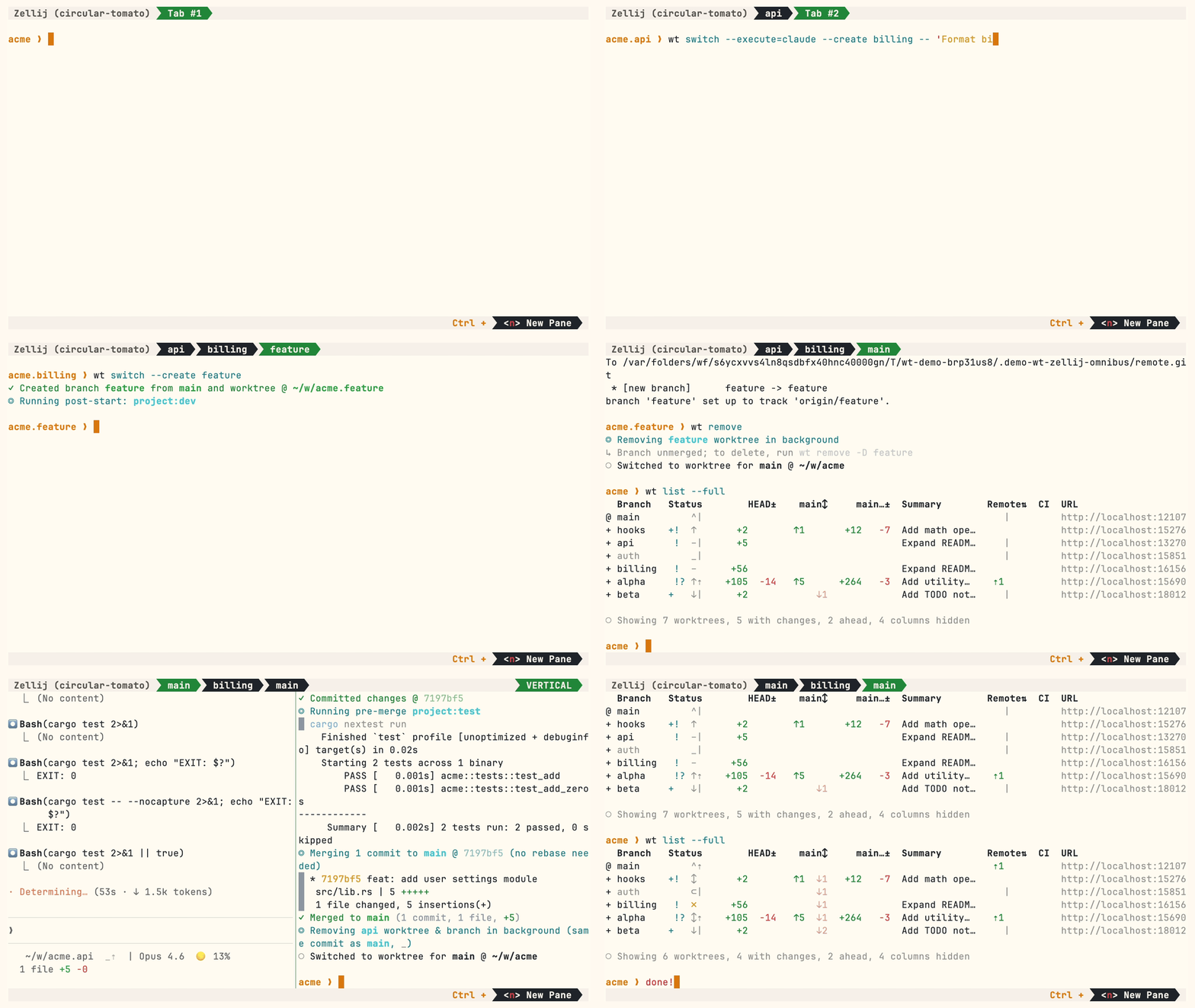
Multiple parallel agents, same simple commands:
Install
Homebrew (macOS & Linux):
brew install worktrunk && wt config shell install
Shell integration allows commands to change directories.
Cargo:
cargo install worktrunk && wt config shell install
Windows & other
Windows. wt defaults to Windows Terminal's command, so Winget additionally installs Worktrunk as git-wt to avoid the conflict:
winget install max-sixty.worktrunk
git-wt config shell install
Alternatively, disable Windows Terminal's alias (Settings → Privacy & security → For developers → App Execution Aliases → disable "Windows Terminal") to use wt directly.
Arch Linux:
sudo pacman -S worktrunk && wt config shell install
Conda / Pixi (community-maintained feedstock):
conda install -c conda-forge worktrunk && wt config shell install
Or with Pixi: pixi global install worktrunk && wt config shell install.
Quick start
Create a worktree for a new feature:
$ wt switch --create feature-auth
✓ Created branch feature-auth from main and worktree @ ~/repo.feature-auth
This creates a new branch and worktree, then switches to it. Do your work, then check all worktrees with wt list:
$ wt list
  Branch        Status        HEAD±    main↕  Remote⇅  Commit    Age   Message
@ feature-auth  +   ↑      +27   -8   ↑1               4bc72dc9  2h    Add authentication module
^ main              ^⇡                         ⇡1      0e631add  1d    Initial commit

○ Showing 2 worktrees, 1 with changes, 1 ahead, 1 column hidden
The @ marks the current worktree. + means staged changes, ↑1 means 1 commit ahead of main, ⇡ means unpushed commits.
When done, either:
PR workflow — commit, push, open a PR, merge via GitHub/GitLab, then clean up:
wt step commit                    # commit staged changes
gh pr create                      # or glab mr create
wt remove                         # after PR is merged
Local merge — squash, rebase onto main, fast-forward merge, clean up:
$ wt merge main
◎ Generating commit message and committing changes... (2 files, +53, no squashing needed)
  Add authentication module
✓ Committed changes @ a1b2c3d
◎ Merging 1 commit to main @ a1b2c3d (no rebase needed)
  * a1b2c3d Add authentication module
   auth.rs | 51 +++++++++++++++++++++++++++++++++++++++++++++++++++
   lib.rs  |  2 ++
   2 files changed, 53 insertions(+)
✓ Merged to main (1 commit, 2 files, +53)
◎ Removing feature-auth worktree & branch in background (same commit as main, _)
○ Switched to worktree for main @ ~/repo
For parallel agents, create multiple worktrees and launch an agent in each:
wt switch -x claude -c feature-a -- 'Add user authentication'
wt switch -x claude -c feature-b -- 'Fix the pagination bug'
wt switch -x claude -c feature-c -- 'Write tests for the API'
The -x flag runs a command after switching; arguments after -- are passed to it. Configure post-start hooks to automate setup (install deps, start dev servers).
Next steps
- Learn the core commands:
wt switch,wt list,wt merge,wt remove - Set up hooks for automated setup
- Explore LLM commit messages, interactive picker, Claude Code integration, CI status & PR links
- Browse tips & patterns for recipes: aliases, dev servers, databases, agent handoffs, and more
- Extending Worktrunk — customize workflows with hooks & aliases
- Run
wt --helporwt <command> --helpfor quick CLI reference
Further reading
- Claude Code: Best practices for agentic coding — Anthropic's official guide, including the worktree pattern
- Shipping faster with Claude Code and Git Worktrees — incident.io's workflow for parallel agents
- Git worktree pattern discussion — Community discussion in the Claude Code repo
- @DevOpsToolbox's video on Worktrunk
- git-worktree documentation — Official git reference
Contributing
- ⭐ Star the repo
- Tell a friend about Worktrunk
- Open an issue — feedback, feature requests, even a small friction or imperfect user message, or a worktree pain not yet solved
- Share: X · Reddit · LinkedIn
📚 Full documentation at worktrunk.dev 📚