USP
Unlike other frameworks, VoltAgent combines a robust TypeScript framework for deep agent control with a comprehensive observability platform (VoltOps Console), enabling seamless development, deployment, and monitoring of complex AI agent s…
Use cases
- 01Building multi-agent systems with supervisor coordination
- 02Automating web interactions and data extraction
- 03Analyzing CSV data and generating insights
- 04Integrating AI agents with persistent memory and RAG
- 05Developing AI coding assistants with MCP
Detected files (2)
examples/with-workspace/workspace/skills/data-analysis/SKILL.mdskillShow content (402 bytes)
--- name: Workspace Data Analyst description: Analyze CSV files in the workspace and summarize insights. version: "1.0.0" tags: - data - csv - analysis references: - references/schema.md assets: - assets/sample.csv --- When analyzing CSV data: 1. Load the file and inspect headers. 2. Summarize totals, averages, and outliers. 3. Provide a short insight summary and recommended next steps.examples/with-workspace/workspace/skills/playwright-cli/SKILL.mdskillShow content (6639 bytes)
---
name: playwright-cli
description: Automates browser interactions for web testing, form filling, screenshots, and data extraction. Use when the user needs to navigate websites, interact with web pages, fill forms, take screenshots, test web applications, or extract information from web pages.
allowed-tools: Bash(playwright-cli:*)
---

# Browser Automation with playwright-cli

## Quick start

```bash
# open new browser
playwright-cli open
# navigate to a page
playwright-cli goto https://playwright.dev
# interact with the page using refs from the snapshot
playwright-cli click e15
playwright-cli type "page.click"
playwright-cli press Enter
# take a screenshot
playwright-cli screenshot
# close the browser
playwright-cli close
```

## Commands

### Core

```bash
playwright-cli open
# open and navigate right away
playwright-cli open https://example.com/
playwright-cli goto https://playwright.dev
playwright-cli type "search query"
playwright-cli click e3
playwright-cli dblclick e7
playwright-cli fill e5 "user@example.com"
playwright-cli drag e2 e8
playwright-cli hover e4
playwright-cli select e9 "option-value"
playwright-cli upload ./document.pdf
playwright-cli check e12
playwright-cli uncheck e12
playwright-cli snapshot
playwright-cli snapshot --filename=after-click.yaml
playwright-cli eval "document.title"
playwright-cli eval "el => el.textContent" e5
playwright-cli dialog-accept
playwright-cli dialog-accept "confirmation text"
playwright-cli dialog-dismiss
playwright-cli resize 1920 1080
playwright-cli close
```

### Navigation

```bash
playwright-cli go-back
playwright-cli go-forward
playwright-cli reload
```

### Keyboard

```bash
playwright-cli press Enter
playwright-cli press ArrowDown
playwright-cli keydown Shift
playwright-cli keyup Shift
```

### Mouse

```bash
playwright-cli mousemove 150 300
playwright-cli mousedown
playwright-cli mousedown right
playwright-cli mouseup
playwright-cli mouseup right
playwright-cli mousewheel 0 100
```

### Save as

```bash
playwright-cli screenshot
playwright-cli screenshot e5
playwright-cli screenshot --filename=page.png
playwright-cli pdf --filename=page.pdf
```

### Tabs

```bash
playwright-cli tab-list
playwright-cli tab-new
playwright-cli tab-new https://example.com/page
playwright-cli tab-close
playwright-cli tab-close 2
playwright-cli tab-select 0
```

### Storage

```bash
playwright-cli state-save
playwright-cli state-save auth.json
playwright-cli state-load auth.json

# Cookies
playwright-cli cookie-list
playwright-cli cookie-list --domain=example.com
playwright-cli cookie-get session_id
playwright-cli cookie-set session_id abc123
playwright-cli cookie-set session_id abc123 --domain=example.com --httpOnly --secure
playwright-cli cookie-delete session_id
playwright-cli cookie-clear

# LocalStorage
playwright-cli localstorage-list
playwright-cli localstorage-get theme
playwright-cli localstorage-set theme dark
playwright-cli localstorage-delete theme
playwright-cli localstorage-clear

# SessionStorage
playwright-cli sessionstorage-list
playwright-cli sessionstorage-get step
playwright-cli sessionstorage-set step 3
playwright-cli sessionstorage-delete step
playwright-cli sessionstorage-clear
```

### Network

```bash
playwright-cli route "**/*.jpg" --status=404
playwright-cli route "https://api.example.com/**" --body='{"mock": true}'
playwright-cli route-list
playwright-cli unroute "**/*.jpg"
playwright-cli unroute
```

### DevTools

```bash
playwright-cli console
playwright-cli console warning
playwright-cli network
playwright-cli run-code "async page => await page.context().grantPermissions(['geolocation'])"
playwright-cli tracing-start
playwright-cli tracing-stop
playwright-cli video-start
playwright-cli video-stop video.webm
```

### Install

```bash
playwright-cli install --skills
playwright-cli install-browser
```

### Configuration

```bash
# Use specific browser when creating session
playwright-cli open --browser=chrome
playwright-cli open --browser=firefox
playwright-cli open --browser=webkit
playwright-cli open --browser=msedge
# Connect to browser via extension
playwright-cli open --extension

# Use persistent profile (by default profile is in-memory)
playwright-cli open --persistent
# Use persistent profile with custom directory
playwright-cli open --profile=/path/to/profile

# Start with config file
playwright-cli open --config=my-config.json

# Close the browser
playwright-cli close
# Delete user data for the default session
playwright-cli delete-data
```

### Browser Sessions

```bash
# create new browser session named "mysession" with persistent profile
playwright-cli -s=mysession open example.com --persistent
# same with manually specified profile directory (use when requested explicitly)
playwright-cli -s=mysession open example.com --profile=/path/to/profile
playwright-cli -s=mysession click e6
playwright-cli -s=mysession close  # stop a named browser
playwright-cli -s=mysession delete-data  # delete user data for persistent session

playwright-cli list
# Close all browsers
playwright-cli close-all
# Forcefully kill all browser processes
playwright-cli kill-all
```

## Example: Form submission

```bash
playwright-cli open https://example.com/form
playwright-cli snapshot

playwright-cli fill e1 "user@example.com"
playwright-cli fill e2 "password123"
playwright-cli click e3
playwright-cli snapshot
playwright-cli close
```

## Example: Multi-tab workflow

```bash
playwright-cli open https://example.com
playwright-cli tab-new https://example.com/other
playwright-cli tab-list
playwright-cli tab-select 0
playwright-cli snapshot
playwright-cli close
```

## Example: Debugging with DevTools

```bash
playwright-cli open https://example.com
playwright-cli click e4
playwright-cli fill e7 "test"
playwright-cli console
playwright-cli network
playwright-cli close
```

```bash
playwright-cli open https://example.com
playwright-cli tracing-start
playwright-cli click e4
playwright-cli fill e7 "test"
playwright-cli tracing-stop
playwright-cli close
```

## Specific tasks

- **Request mocking** [references/request-mocking.md](references/request-mocking.md)
- **Running Playwright code** [references/running-code.md](references/running-code.md)
- **Browser session management** [references/session-management.md](references/session-management.md)
- **Storage state (cookies, localStorage)** [references/storage-state.md](references/storage-state.md)
- **Test generation** [references/test-generation.md](references/test-generation.md)
- **Tracing** [references/tracing.md](references/tracing.md)
- **Video recording** [references/video-recording.md](references/video-recording.md)
README
AI Agent Engineering Platform








⭐ Like what we're doing? Give us a star ⬆️
VoltAgent is an end-to-end AI Agent Engineering Platform that consists of two main parts:
- Open-Source TypeScript Framework – Memory, RAG, Guardrails, Tools, MCP, Voice, Workflow, and more.
- VoltOps Console
CloudSelf-Hosted– Observability, Automation, Deployment, Evals, Guardrails, Prompts, and more.
Build agents with full code control and ship them with production-ready visibility and operations.
Core TypeScript Framework
With the open-source framework, you can build intelligent agents with memory, tools, and multi-step workflows while connecting to any AI provider. Create sophisticated multi-agent systems where specialized agents work together under supervisor coordination.
- Core Runtime (
@voltagent/core): Define agents with typed roles, tools, memory, and model providers in one place so everything stays organized. - Workflow Engine: Describe multi-step automations declaratively rather than stitching together custom control flow.
- Supervisors & Sub-Agents: Run teams of specialized agents under a supervisor runtime that routes tasks and keeps them in sync.
- Tool Registry & MCP: Ship Zod-typed tools with lifecycle hooks and cancellation, and connect to Model Context Protocol servers without extra glue code.
- LLM Compatibility: Swap between OpenAI, Anthropic, Google, or other providers by changing config, not rewriting agent logic.
- Memory: Attach durable memory adapters so agents remember important context across runs.
- Resumable Streaming: Let clients reconnect to in-flight streams after refresh and continue receiving the same response.
- Retrieval & RAG: Plug in retriever agents to pull facts from your data sources and ground responses (RAG) before the model answers.
- VoltAgent Knowledge Base: Use the managed RAG service for document ingestion, chunking, embeddings, and search.
- Voice: Add text-to-speech and speech-to-text capabilities with OpenAI, ElevenLabs, or custom voice providers.
- Guardrails: Intercept and validate agent input or output at runtime to enforce content policies and safety rules.
- Evals: Run agent eval suites alongside your workflows to measure and improve agent behavior.
MCP Server (@voltagent/mcp-docs-server)
You can use the MCP server @voltagent/mcp-docs-server to teach your LLM how to use VoltAgent for AI-powered coding assistants like Claude, Cursor, or Windsurf. This allows AI assistants to access VoltAgent documentation, examples, and changelogs directly while you code.
📖 How to setup MCP docs server
⚡ Quick Start
Create a new VoltAgent project in seconds using the create-voltagent-app CLI tool:
npm create voltagent-app@latest
This command guides you through setup.
You'll see the starter code in src/index.ts, which now registers both an agent and a comprehensive workflow example found in src/workflows/index.ts.
import { VoltAgent, Agent, Memory } from "@voltagent/core";
import { LibSQLMemoryAdapter } from "@voltagent/libsql";
import { createPinoLogger } from "@voltagent/logger";
import { honoServer } from "@voltagent/server-hono";
import { openai } from "@ai-sdk/openai";
import { expenseApprovalWorkflow } from "./workflows";
import { weatherTool } from "./tools";

// Create a logger instance
const logger = createPinoLogger({
  name: "my-agent-app",
  level: "info",
});

// Optional persistent memory (remove to use default in-memory)
const memory = new Memory({
  storage: new LibSQLMemoryAdapter({ url: "file:./.voltagent/memory.db" }),
});

// A simple, general-purpose agent for the project.
const agent = new Agent({
  name: "my-agent",
  instructions: "A helpful assistant that can check weather and help with various tasks",
  model: openai("gpt-4o-mini"),
  tools: [weatherTool],
  memory,
});

// Initialize VoltAgent with your agent(s) and workflow(s)
new VoltAgent({
  agents: {
    agent,
  },
  workflows: {
    expenseApprovalWorkflow,
  },
  server: honoServer(),
  logger,
});
Afterwards, navigate to your project and run:
npm run dev
When you run the dev command, tsx will compile and run your code. You should see the VoltAgent server startup message in your terminal:
══════════════════════════════════════════════════
VOLTAGENT SERVER STARTED SUCCESSFULLY
══════════════════════════════════════════════════
✓ HTTP Server: http://localhost:3141

Test your agents with VoltOps Console: https://console.voltagent.dev
══════════════════════════════════════════════════
Your agent is now running! To interact with it:
- Open the Console: Click the VoltOps LLM Observability Platform link in your terminal output (or copy-paste it into your browser).
- Find Your Agent: On the VoltOps LLM Observability Platform page, you should see your agent listed (e.g., "my-agent").
- Open Agent Details: Click on your agent's name.
- Start Chatting: On the agent detail page, click the chat icon in the bottom right corner to open the chat window.
- Send a Message: Type a message like "Hello" and press Enter.

Running Your First Workflow
Your new project also includes a powerful workflow engine.
The expense approval workflow demonstrates human-in-the-loop automation with suspend/resume capabilities:
import { createWorkflowChain } from "@voltagent/core";
import { z } from "zod";

export const expenseApprovalWorkflow = createWorkflowChain({
  id: "expense-approval",
  name: "Expense Approval Workflow",
  purpose: "Process expense reports with manager approval for high amounts",

  input: z.object({
    employeeId: z.string(),
    amount: z.number(),
    category: z.string(),
    description: z.string(),
  }),
  result: z.object({
    status: z.enum(["approved", "rejected"]),
    approvedBy: z.string(),
    finalAmount: z.number(),
  }),
})
  // Step 1: Validate expense and check if approval needed
  .andThen({
    id: "check-approval-needed",
    resumeSchema: z.object({
      approved: z.boolean(),
      managerId: z.string(),
      comments: z.string().optional(),
      adjustedAmount: z.number().optional(),
    }),
    execute: async ({ data, suspend, resumeData }) => {
      // If we're resuming with manager's decision
      if (resumeData) {
        return {
          ...data,
          approved: resumeData.approved,
          approvedBy: resumeData.managerId,
          finalAmount: resumeData.adjustedAmount || data.amount,
        };
      }

      // Check if manager approval is needed (expenses over $500)
      if (data.amount > 500) {
        await suspend("Manager approval required", {
          employeeId: data.employeeId,
          requestedAmount: data.amount,
        });
      }

      // Auto-approve small expenses
      return {
        ...data,
        approved: true,
        approvedBy: "system",
        finalAmount: data.amount,
      };
    },
  })
  // Step 2: Process the final decision
  .andThen({
    id: "process-decision",
    execute: async ({ data }) => {
      return {
        status: data.approved ? "approved" : "rejected",
        approvedBy: data.approvedBy,
        finalAmount: data.finalAmount,
      };
    },
  });
You can test the pre-built expenseApprovalWorkflow directly from the VoltOps console:
- Go to the Workflows Page: After starting your server, go directly to the Workflows page.
- Select Your Project: Use the project selector to choose your project (e.g., "my-agent-app").
- Find and Run: You will see "Expense Approval Workflow" listed. Click it, then click the "Run" button.
- Provide Input: The workflow expects a JSON object with expense details. Try a small expense for automatic approval:
{ "employeeId": "EMP-123", "amount": 250, "category": "office-supplies", "description": "New laptop mouse and keyboard" } - View the Results: After execution, you can inspect the detailed logs for each step and see the final output directly in the console.
Examples
For more examples, visit our examples repository.
- Airtable Agent - React to new records and write updates back into Airtable with VoltOps actions.
- Slack Agent - Respond to channel messages and reply via VoltOps Slack actions.
- ChatGPT App With VoltAgent - Deploy VoltAgent over MCP and connect to ChatGPT Apps.
- WhatsApp Order Agent - Build a WhatsApp chatbot that handles food orders through natural conversation. (Source)
- YouTube to Blog Agent - Convert YouTube videos into Markdown blog posts using a supervisor agent with MCP tools. (Source)
- AI Ads Generator Agent - Generate Instagram ads using BrowserBase Stagehand and Google Gemini AI. (Source)
- AI Recipe Generator Agent - Create personalized cooking suggestions based on ingredients and preferences. (Source | Video)
- AI Research Assistant Agent - Multi-agent research workflow for generating comprehensive reports. (Source | Video)
VoltOps Console: LLM Observability - Automation - Deployment
VoltOps Console is the platform side of VoltAgent, providing observability, automation, and deployment so you can monitor and debug agents in production with real-time execution traces, performance metrics, and visual dashboards.
Observability & Tracing
Deep dive into agent execution flow with detailed traces and performance metrics.
Dashboard
Get a comprehensive overview of all your agents, workflows, and system performance metrics.
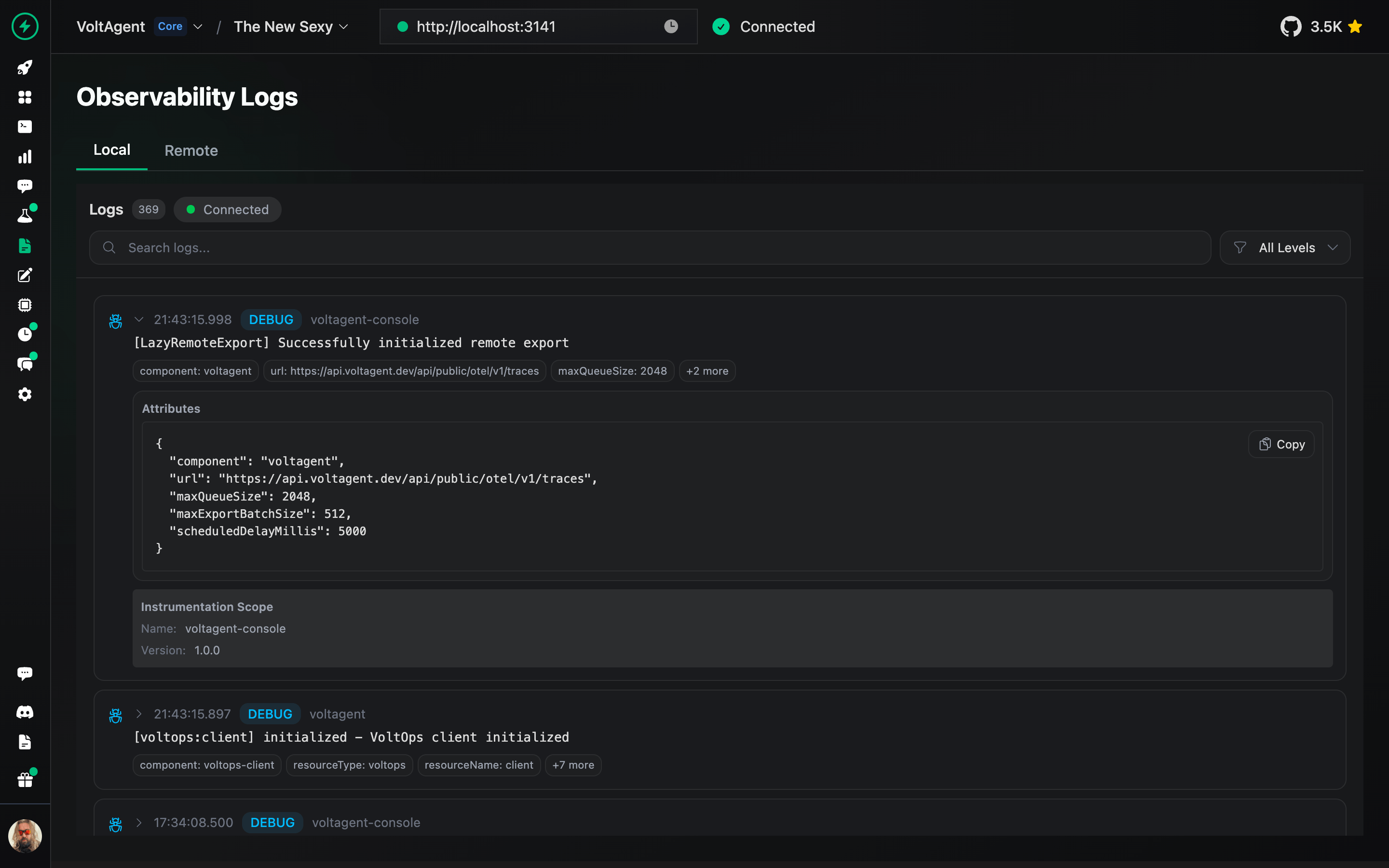
Logs
Track detailed execution logs for every agent interaction and workflow step.
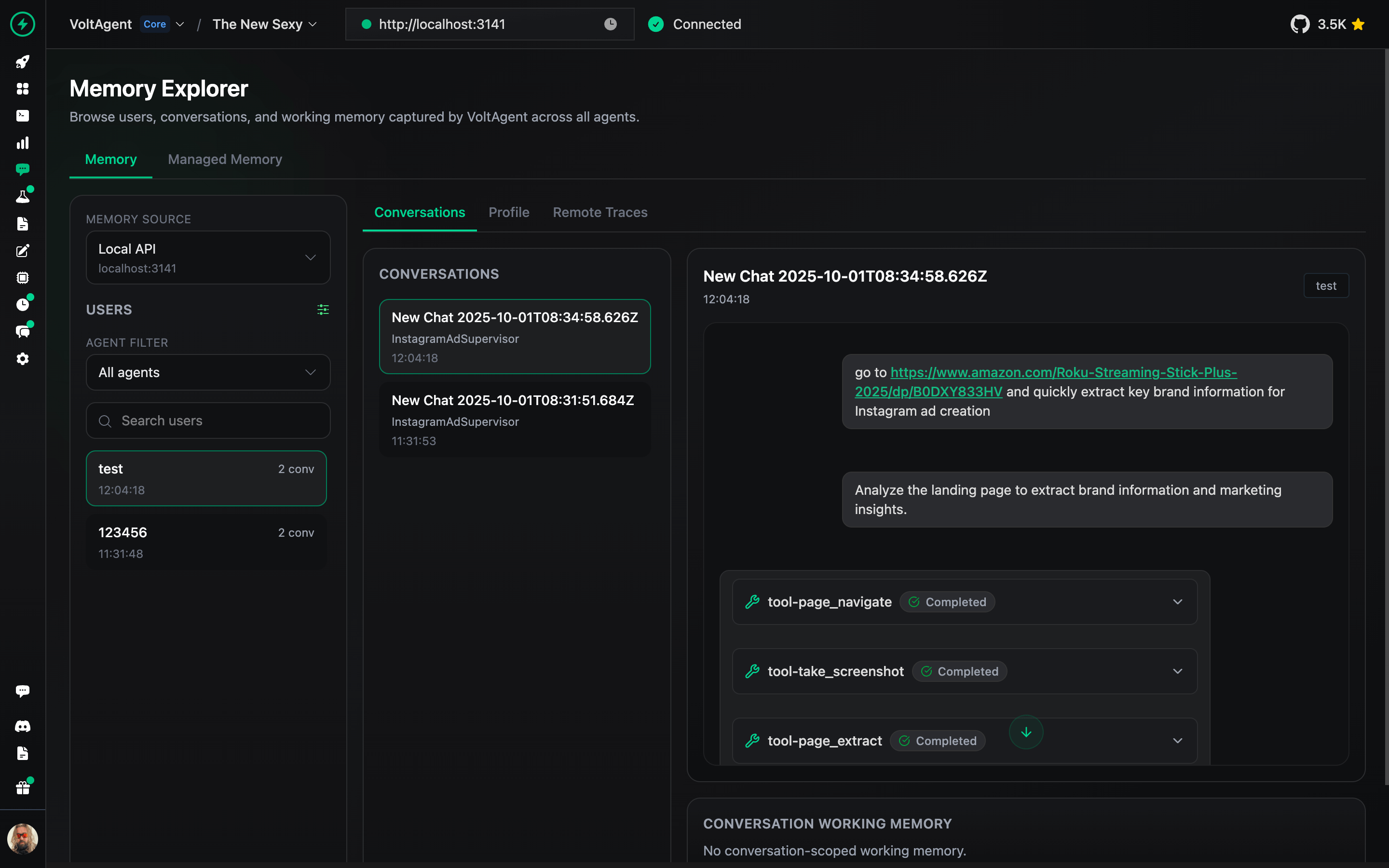
Memory Management
Inspect and manage agent memory, context, and conversation history.
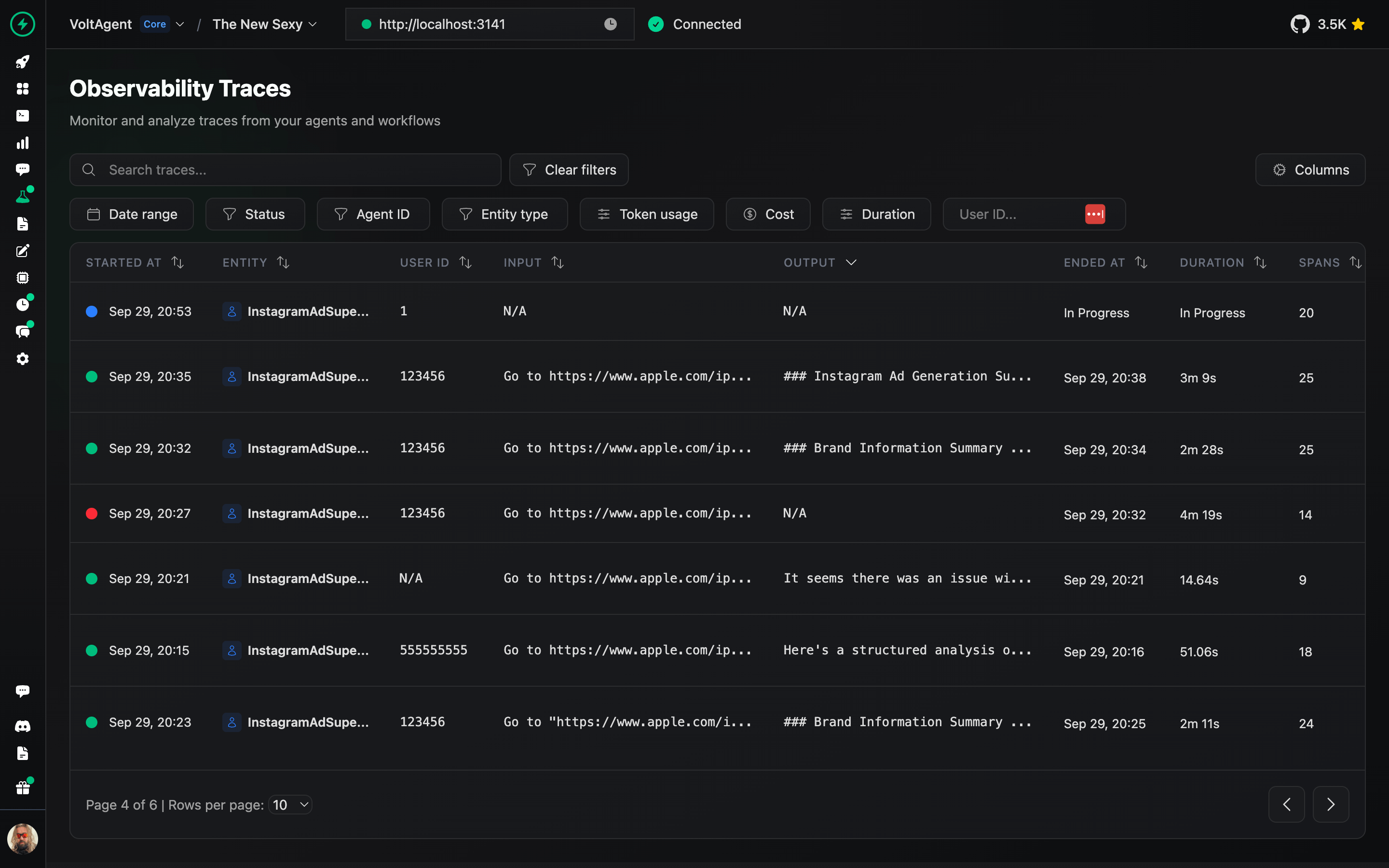
Traces
Analyze complete execution traces to understand agent behavior and optimize performance.
Prompt Builder
Design, test, and refine prompts directly in the console.
Deployment
Deploy your agents to production with one-click GitHub integration and managed infrastructure.
📖 VoltOps Deploy Documentation
Triggers & Actions
Automate agent workflows with webhooks, schedules, and custom triggers to react to external events.
Monitoring
Monitor agent health, performance metrics, and resource usage across your entire system.
Guardrails
Set up safety boundaries and content filters to ensure agents operate within defined parameters.
Evals
Run evaluation suites to test agent behavior, accuracy, and performance against benchmarks.
RAG (Knowledge Base)
Connect your agents to knowledge sources with built-in retrieval-augmented generation capabilities.
Learning VoltAgent
- Start with interactive tutorial to learn the fundamentals building AI Agents.
- Documentation: Dive into guides, concepts, and tutorials.
- Examples: Explore practical implementations.
- Blog: Read more about technical insights, and best practices.
Contribution
We welcome contributions! Please refer to the contribution guidelines (link needed if available). Join our Discord server for questions and discussions.
Contributor ♥️ Thanks
Big thanks to everyone who's been part of the VoltAgent journey, whether you've built a plugin, opened an issue, dropped a pull request, or just helped someone out on Discord or GitHub Discussions.
VoltAgent is a community effort, and it keeps getting better because of people like you.
License
Licensed under the MIT License, Copyright © 2026-present VoltAgent.